Slides / 7 of 19
Talk slides
SpyNote in action: how a mobile spyware trojan is created, deployed and examined
Natalia Kotova · Forensic Science Centre of the Yaroslavl Regional Police, EKC UMVD
Day 1 — Thursday, 11 September 2025: digital forensics day · Scheduled 15:35–16:05 · In the recording 03:00:18–03:30:22
These slides are an English version of the Russian deck shown in the recording: the text the authors set in the presentation has been translated and redrawn in place, while everything captured from a screen — program windows, logs, evidence — is left exactly as it was, in Russian. The fonts are the closest available ones, not the originals. The Russian deck is on the RU version of this page. Under each slide its text is set out for word search and machine reading.
Page 103:01:03 Slide text
IMIL
MOSCOW
FORENSICS
DAY '25
NATALIA KOTOVA
“SPYNOTE IN ACTION: HOW A MOBILE SPYWARE TROJAN IS CREATED, DEPLOYED AND EXAMINED”
MFD
MFD
Page 203:01:45 Slide text
{SpyNote} in action
how a mobile spyware trojan is created, deployed and examined
NATALIA KOTOVA MOSCOW FORENSICS DAY '25
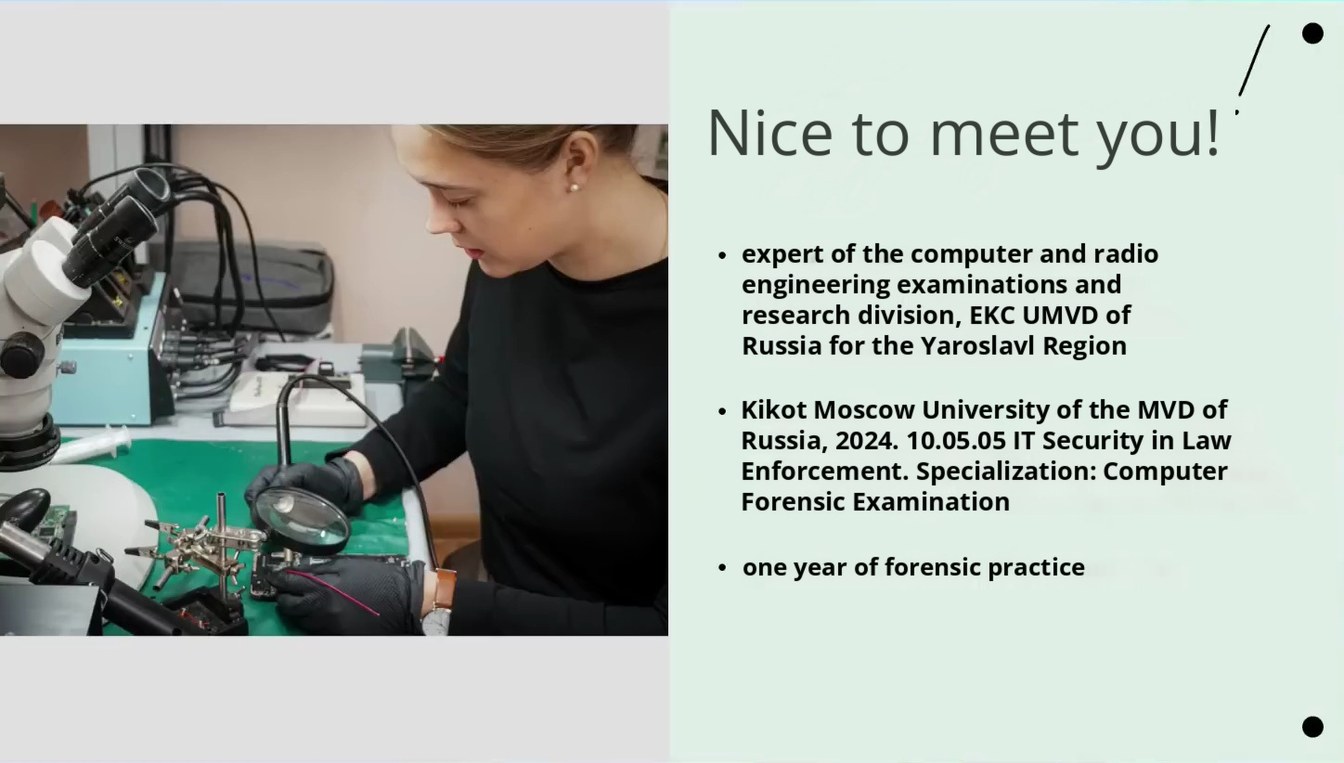
Page 303:02:26 Slide text
Nice to meet you!
expert of the computer and radio engineering examinations and research division, EKC UMVD of Russia for the Yaroslavl Region Kikot Moscow University of the MVD of Russia, 2024. 10.05.05 IT Security in Law Enforcement. Specialization: Computer Forensic Examination
one year of forensic practice
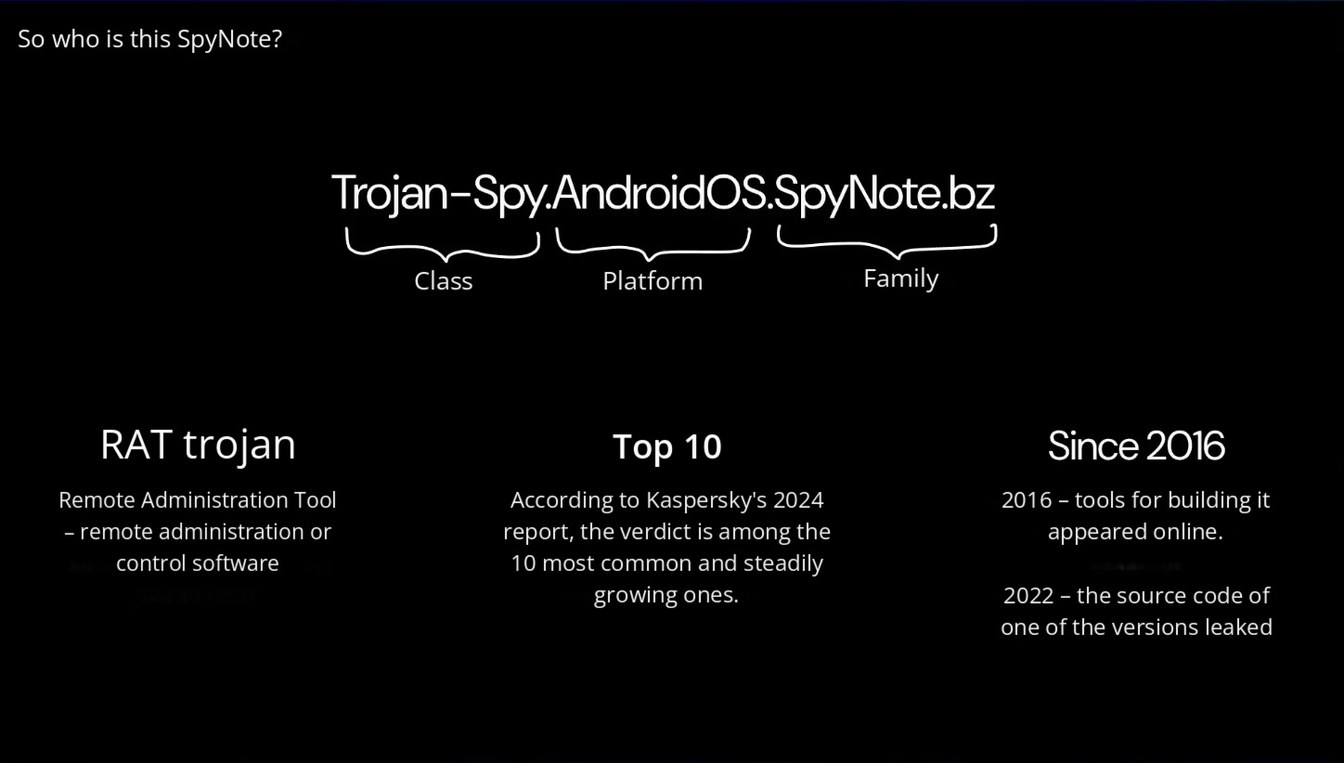
Page 403:03:02 Slide text
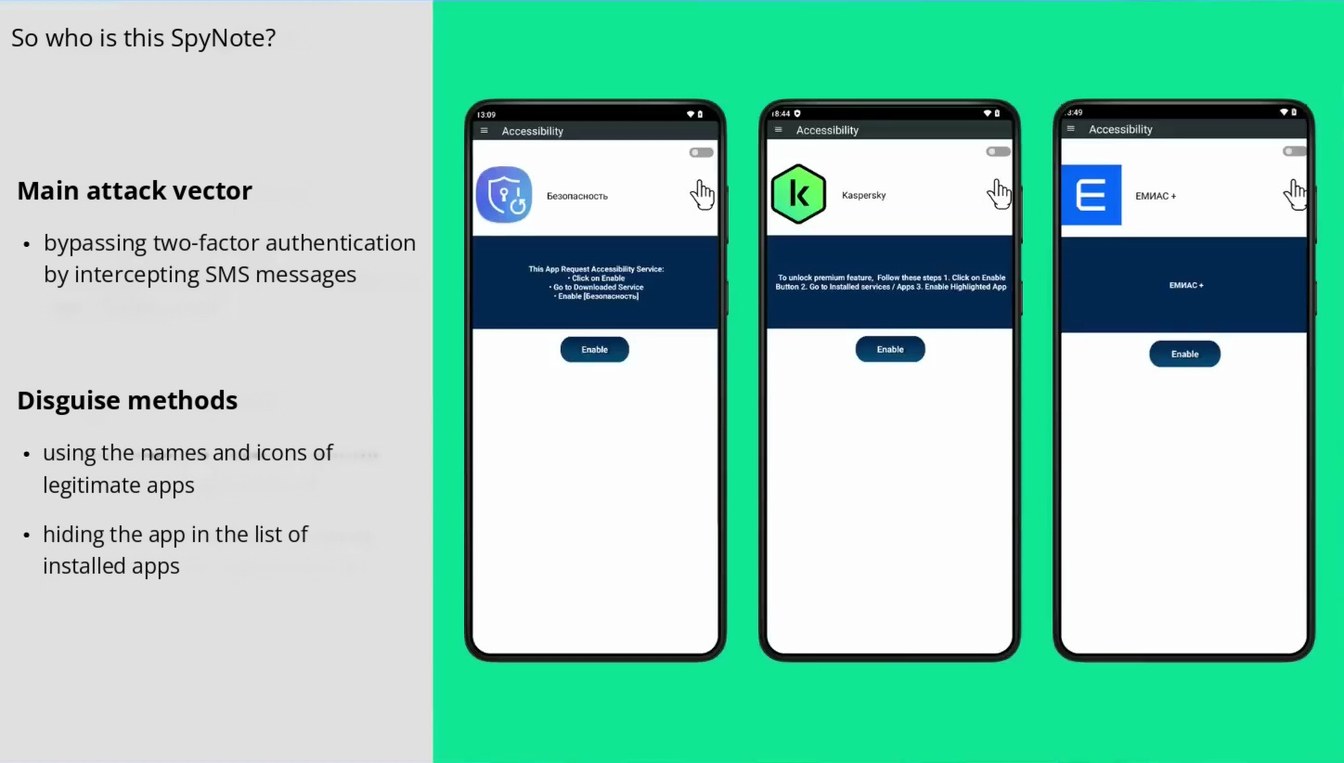
So who is this SpyNote?
Trojan-Spy.AndroidOS.SpyNote.bz
Class
Platform
Family
RAT trojan
Top 10
Since 2016
Remote Administration Tool – remote administration or control software
According to Kaspersky's 2024 report, the verdict is among the 10 most common and steadily growing ones.
2016 – tools for building it appeared online.
2022 – the source code of one of the versions leaked
Page 503:03:38 Slide text
So who is this SpyNote?
13:09
Accessibility
18:44 0
Accessibility
3:49
Accessibility
Main attack vector
Безопасность
Kaspersky
ЕМИАС +
bypassing two-factor authentication by intercepting SMS messages
This App Request Accessibility Service:
• Click on Enable
• Enable [Безопасность)
To unlock premium feature, Follow these steps 1. Click on Enable Button 2. Go to Installed services / Apps 3. Enable Highlighted App
Enable
Enable
Enable
Disguise methods
using the names and icons of legitimate apps hiding the app in the list of installed apps
Page 603:04:25 Slide text
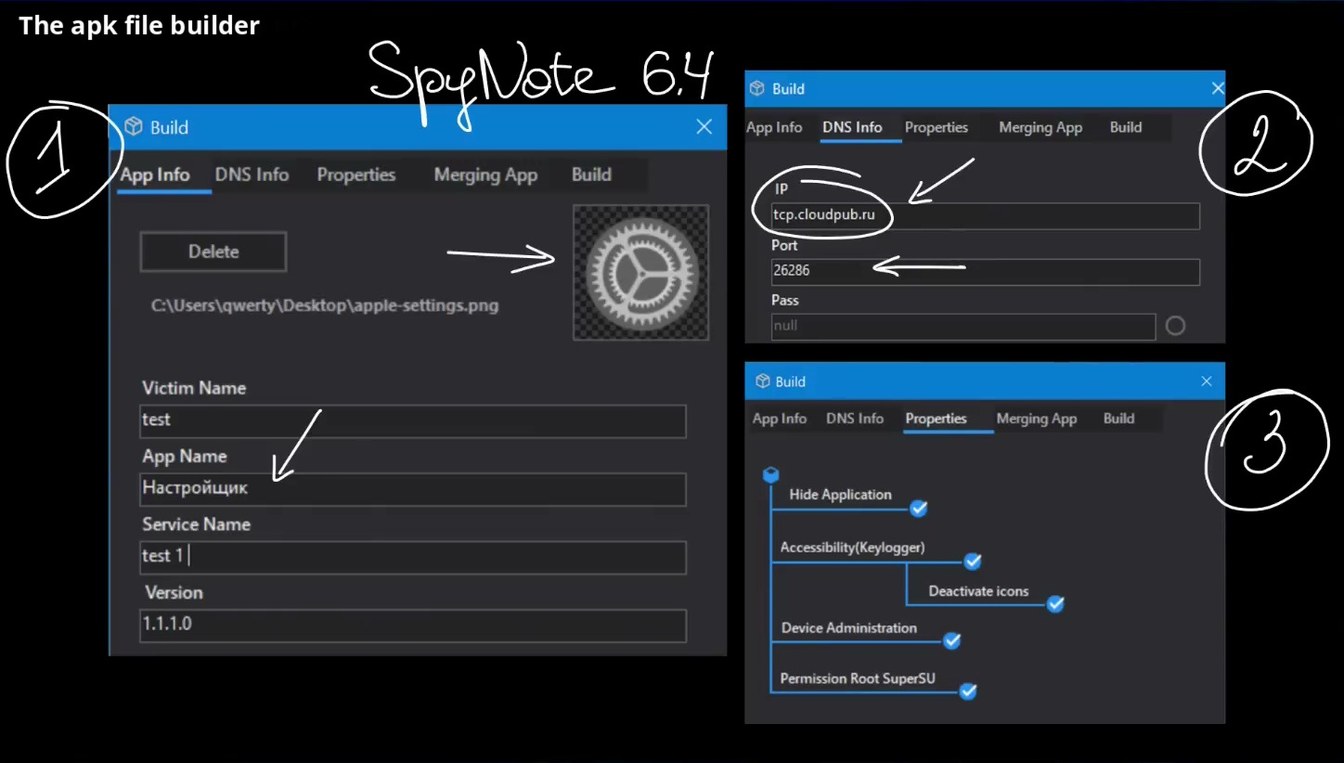
The apk file builder
SpeNote 6.4
Build
DNS Info Properties
App Info
Merging App
Build
Build
Merging App
App Info
DNS Info Properties
Build
IP
2
Delete
C\Users\qwerty\Desktop\apple-settings.png
tcp.cloudpub.ru
Port
26286
Pass
nuil
Victim Name
test
Build
Build
Properties
App Info
DNS Info
Merging App
App Name Настройщик
Service Name
test 1|
Hide Application
Accessibility(Keylogger)
Version
Deactivate icons
Device Administration
Permission Root SuperSU
Page 703:05:10 Slide text
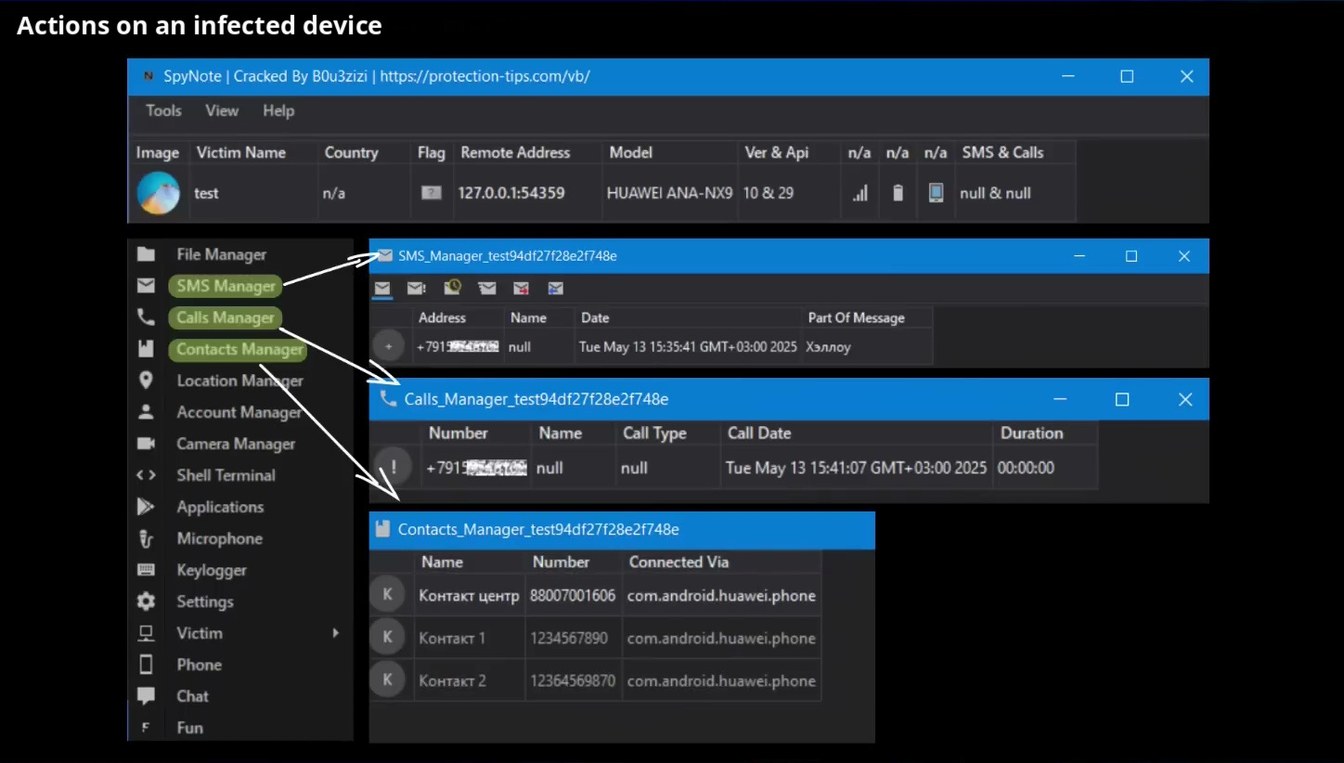
Actions on an infected device
SpyNote | Cracked By BOu3zizi | https://protection-tips.com/vb/
Tools
View
Help
Image
Country
Model
Victim Name
Flag
Remote Address
Ver & Api
SMS & Calls
test
10 & 29
127.0.0.1:54359
HUAWEI ANA-NX9
all
null & null
File Manager
SMS Manager
Calls Manager
Contacts Manager
Location Man
ger
Account Manager
Camera Manager
Shell Terminal
SMS_Manager_test94df27f28e2f748e
Address
Part Of Message
Name
Date
+ 79139648469
null
Tue May 13 15:35:41 GMT+ 03:00 2025 Хэллоу
- Calls_Manager_test94df271282f748e
Call Type
Duration
Call Date
Name
Number
+79199544168
00:00:00
Tue May 13 15:41:07 GMT+03:00 2025
null
null
Applications
Microphone
Keylogger
Settings
Victim
Phone
Chat
Contacts_Manager_test94df27f28e2f748e
Name
Number
Connected Via
88007001606
com.android.huawei.phone
Контакт центр
Контакт 1
1234567890
com.android.huawei.phone
Контакт 2
12364569870
com.android.huawei.phone
Fun
Page 803:05:39 Slide text
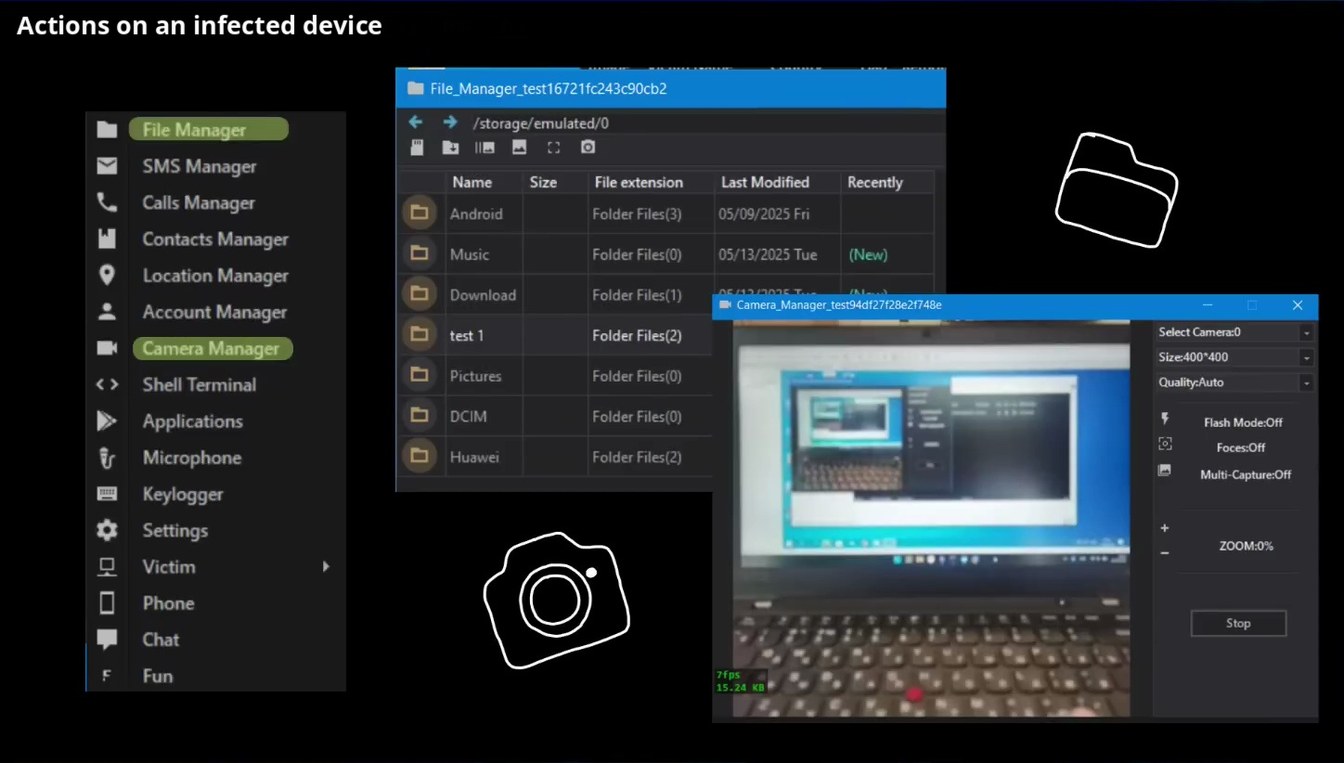
Actions on an infected device
File_Manager_test16721fc243c90cb2
File Manager
/storage/emulated/0
SMS Manager
Calls Manager
Contacts Manager
Location Manager
Account Manager
Camera Manager
Shell Terminal
Recently
File extension
Last Modified
Name
Size
Android
Folder Files(3)
05/09/2025 Fri
Music
Folder Files(0)
05/13/2025 Tue
(New)
Download
Folder Files(1)
•* Camera_Manager_test94df27f28e2f748e
test 1
Folder Files(2)
Pictures
Folder Files(0)
Select Camera:0
Size:400*400
Quality:Auto
Applications
Microphone
Keylogger
Settings
Victim
DCIM
Huawei
Folder Files(0)
Folder Files(2)
Flash Mode:Off
Foces:Off
Multi-Capture:Off
ZOOM:0%
Phone
Chat
Stop
Fun
7fps 15.24 KB
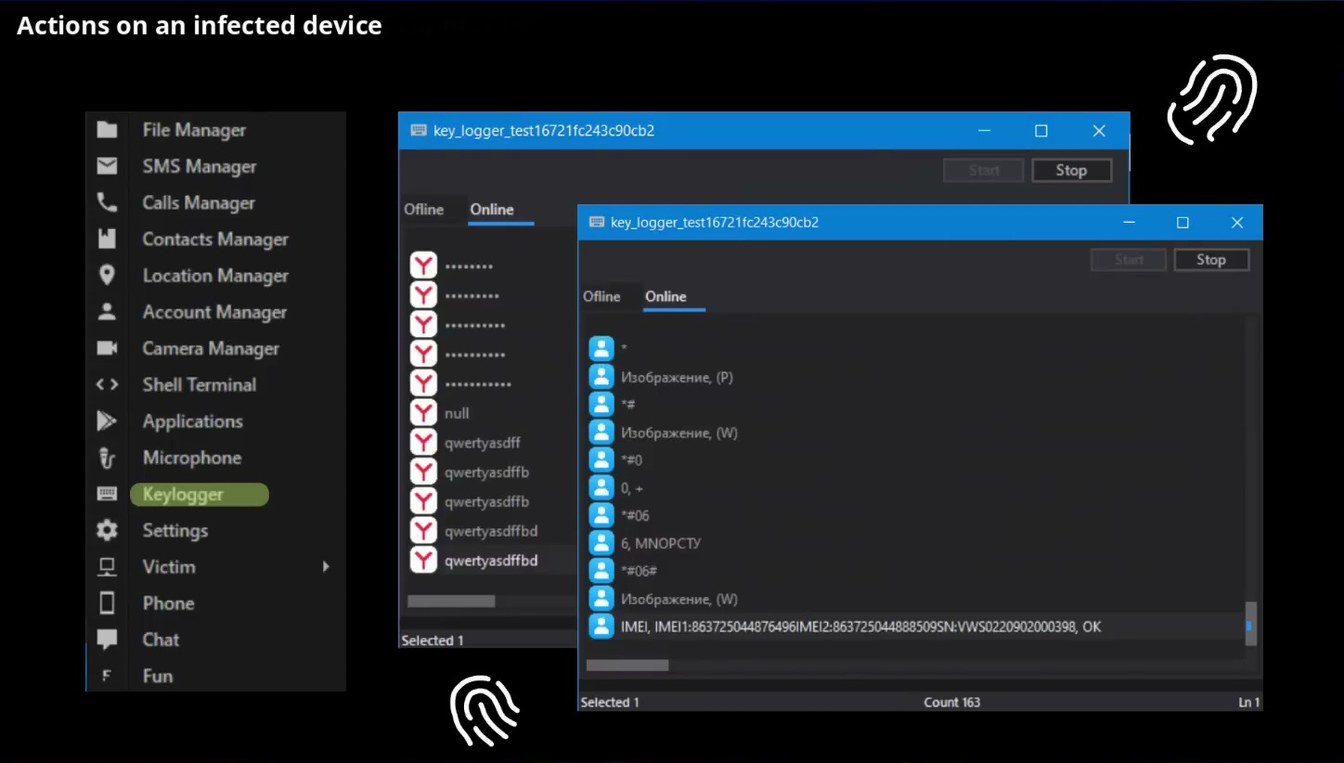
Page 903:06:14 Slide text
Actions on an infected device
File Manager
key_logger_test16721fc243c90cb2
SMS Manager
Calls Manager
Contacts Manager
Location Manager
Account Manager
Camera Manager
Shell Terminal
Applications
Microphone
Keylogger
Settings
Victim
Phone
Chat
Ofline
Online
null
qwertyasdff
qwertyasdffb
qwertyasdffb
qwertyasdffbd
qwertyasdffbd
Selected 1
Start
Stop
# key_logger_test16721fc243c90cb2
Start
Ofline
Online
Изображение, (Р)
Изображение, (W)
*#06
6, MNOPCTY
*#06#
Изображение, (W)
IMEI, IMEI1:863725044876496I|
MEI2:863725044888509SN:VWS0220902000398, OK
Stop
Fun
Selected 1
Count 163
Ln 1
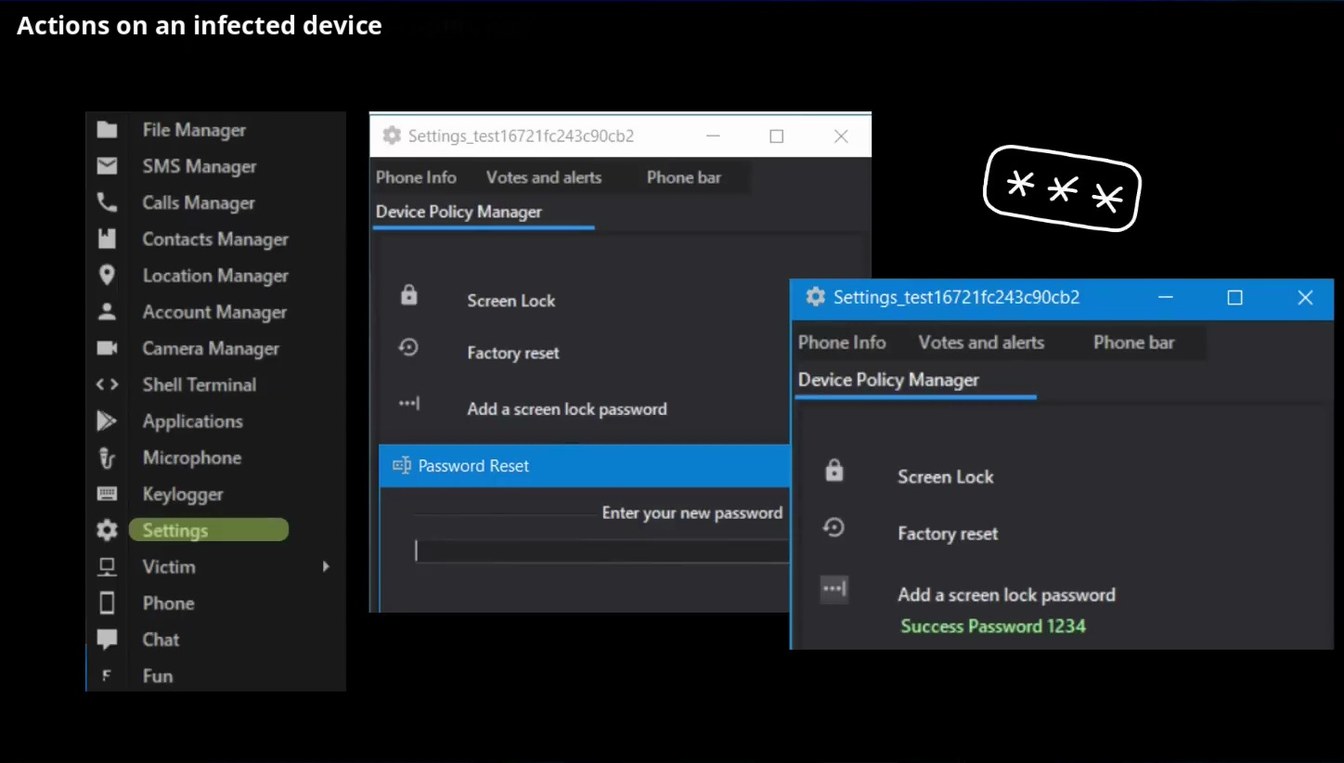
Page 1003:06:41 Slide text
Actions on an infected device
File Manager
SMS Manager
Calls Manager
Contacts Manager
Location Manager
Account Manager
Camera Manager
Shell Terminal
Applications
Microphone
Keylogger
Settings
Victim
Phone
Chat
Settings_test16721fc243c90cb2
Phone Info
Votes and alerts
Phone bar
Device Policy Manager
Screen Lock
* Settings_test16721fc243c90cb2
Factory reset
Add a screen lock password
Phone Info Votes and alerts
Device Policy Manager
Phone bar
Ej Password Reset
Screen Lock
Enter your new password
Factory reset
Add a screen lock password Success Password 1234
Fun
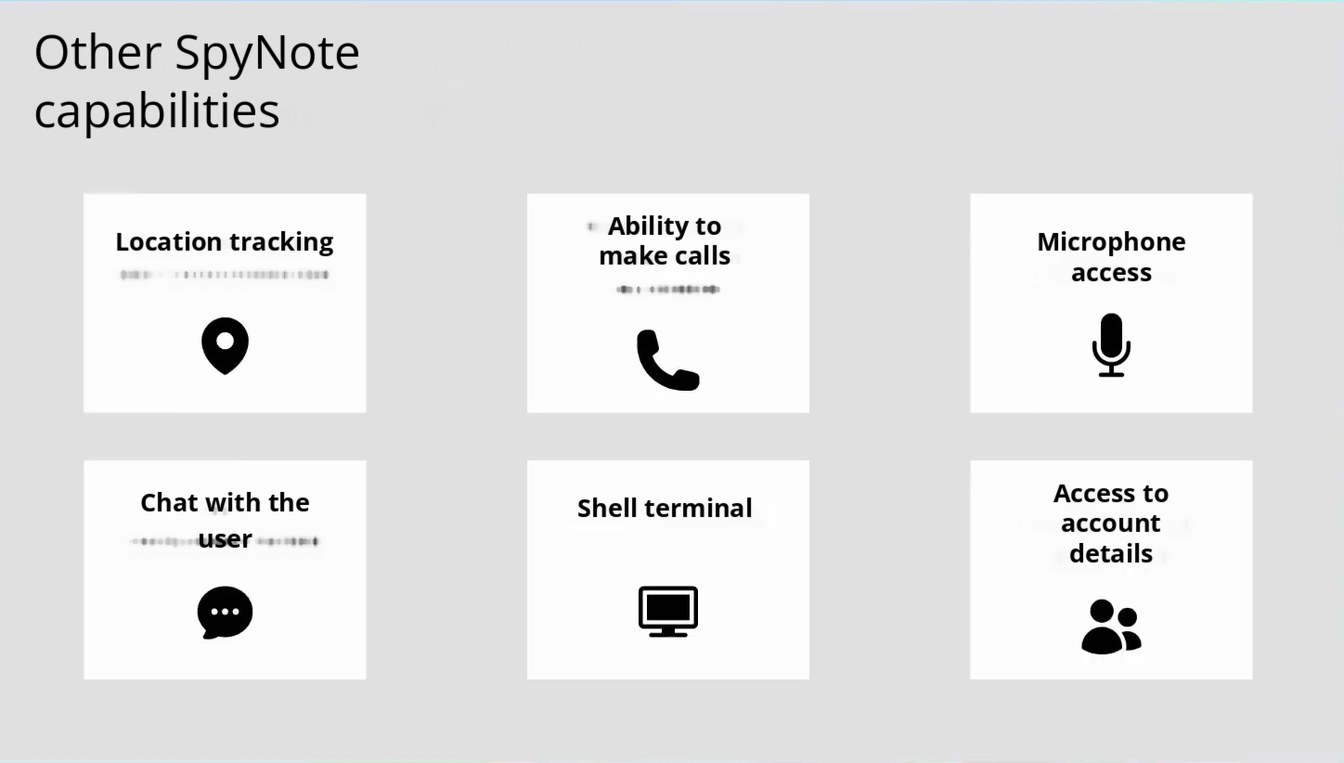
Page 1103:06:52 Slide text
Other SpyNote capabilities
Location tracking
Ability to make calls
Microphone access
Chat with the user
Shell terminal
Access to account details
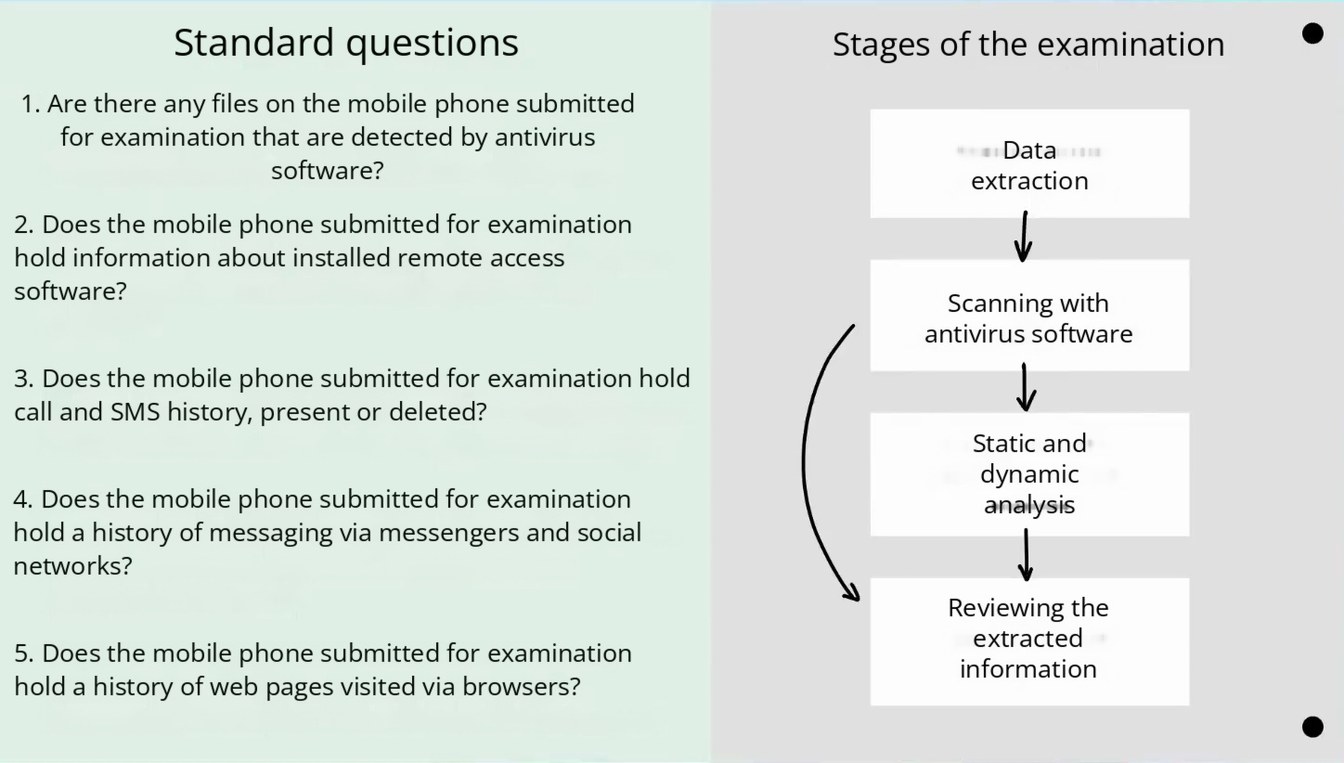
Page 1203:07:57 Slide text
Standard questions
Stages of the examination
1. Are there any files on the mobile phone submitted for examination that are detected by antivirus software?
Data extraction
2. Does the mobile phone submitted for examination hold information about installed remote access software?
3. Does the mobile phone submitted for examination hold call and SMS history, present or deleted?
4. Does the mobile phone submitted for examination hold a history of messaging via messengers and social networks?
5. Does the mobile phone submitted for examination hold a history of web pages visited via browsers?
Scanning with antivirus software
Static and dynamic analysis
Reviewing the extracted information
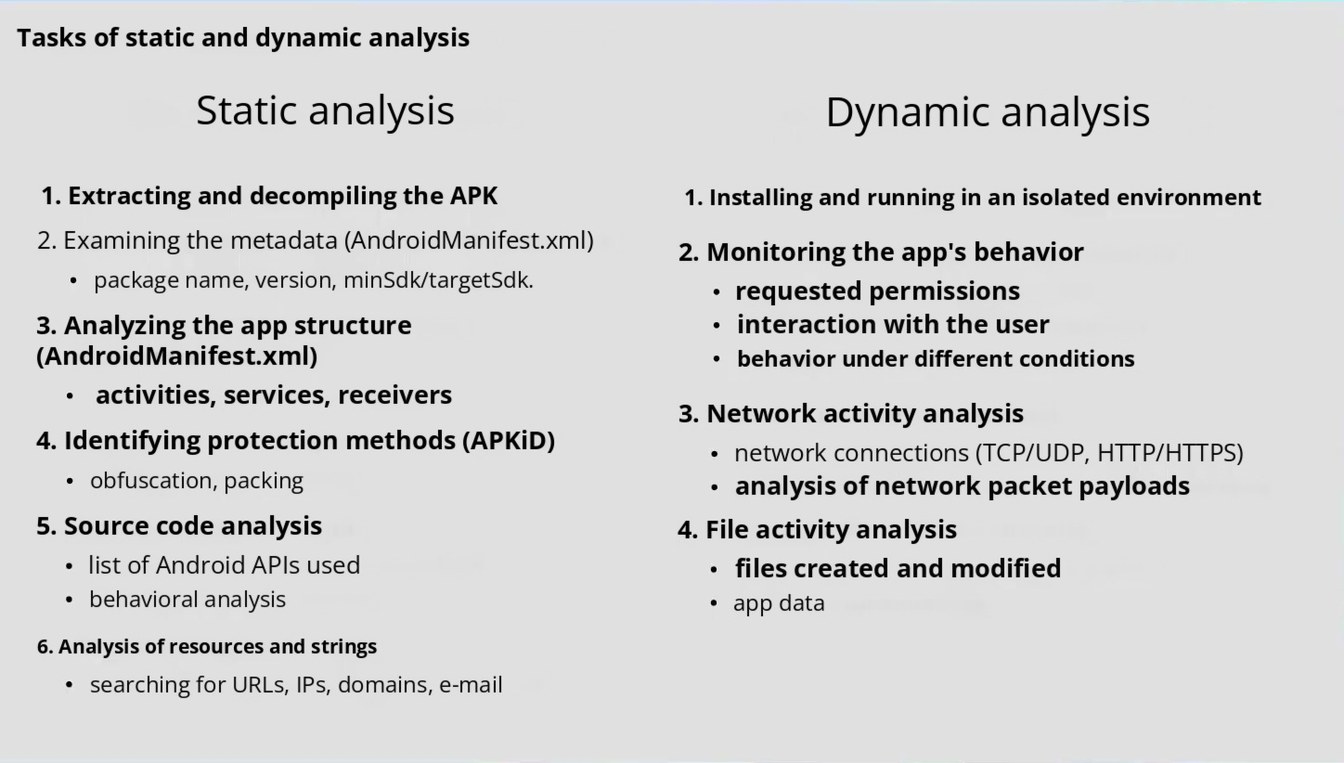
Page 1303:09:26 Slide text
Tasks of static and dynamic analysis
Static analysis
Dynamic analysis
1. Extracting and decompiling the APK
2. Examining the metadata (AndroidManifest.xml)
package name, version, minSdk/targetSdk.
3. Analyzing the app structure (AndroidManifest.xml)
activities, services, receivers
4. Identifying protection methods (APKiD)
obfuscation, packing
5. Source code analysis
list of Android APIs used behavioral analysis
1. Installing and running in an isolated environment
2. Monitoring the app's behavior
requested permissions
interaction with the user
behavior under different conditions
3. Network activity analysis
network connections (TCP/UDP, HTTP/HTTPS) analysis of network packet payloads
4. File activity analysis
files created and modified app data
6. Analysis of resources and strings searching for URLs, IPs, domains, e-mail
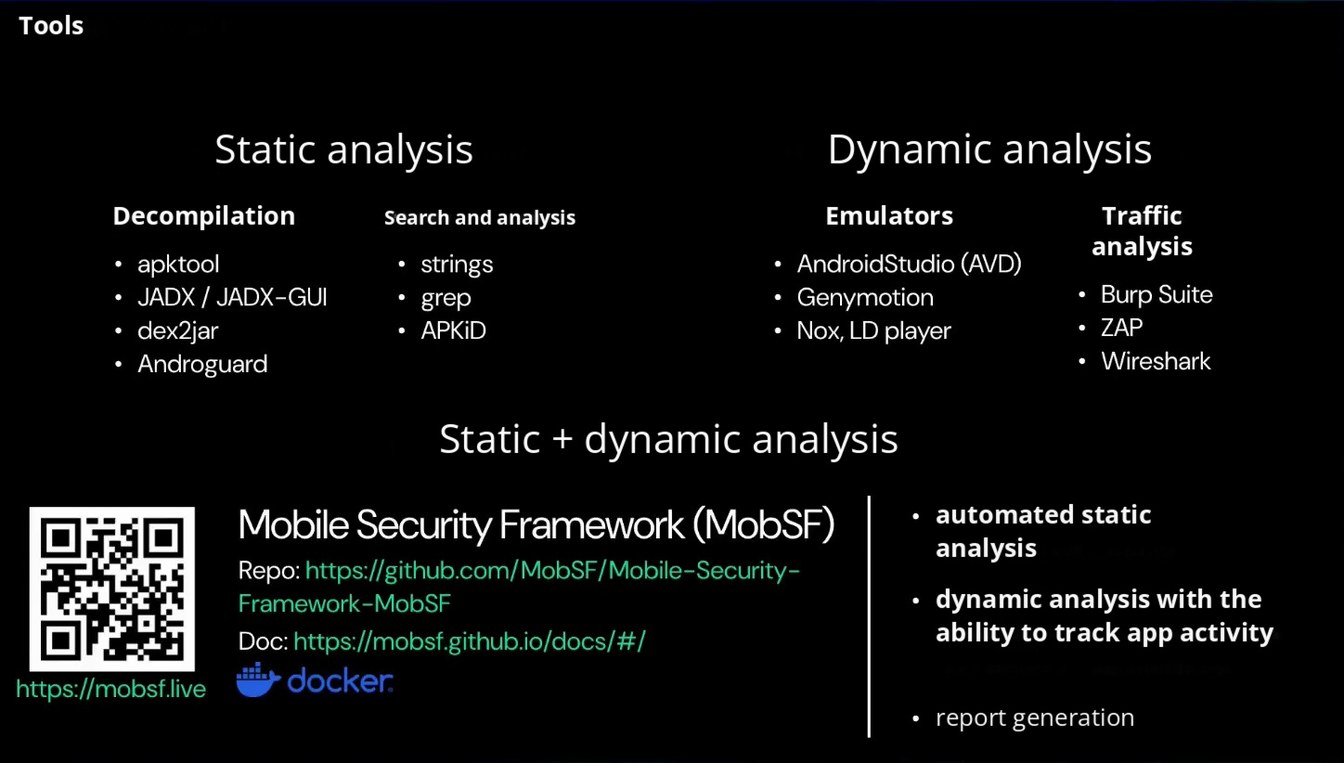
Page 1403:11:37 Slide text
Tools
Static analysis
Dynamic analysis
Decompilation
• apktool • JADX / JADX-GUI • dex2jar • Androguard
Search and analysis
• strings • grep • APKiD
Emulators
• AndroidStudio (AVD)
• Genymotion • Nox, LD player
Traffic analysis
• Burp Suite • ZAP • Wireshark
Static + dynamic analysis
Mobile Security Framework (MobSF)
Repo: https://github.com/MobSF/Mobile-Security- Framework-MobSF
Doc: https://molsf.github.io/docs/#/ * docker.
https://mobsf.live
automated static analysis
dynamic analysis with the ability to track app activity
report generation
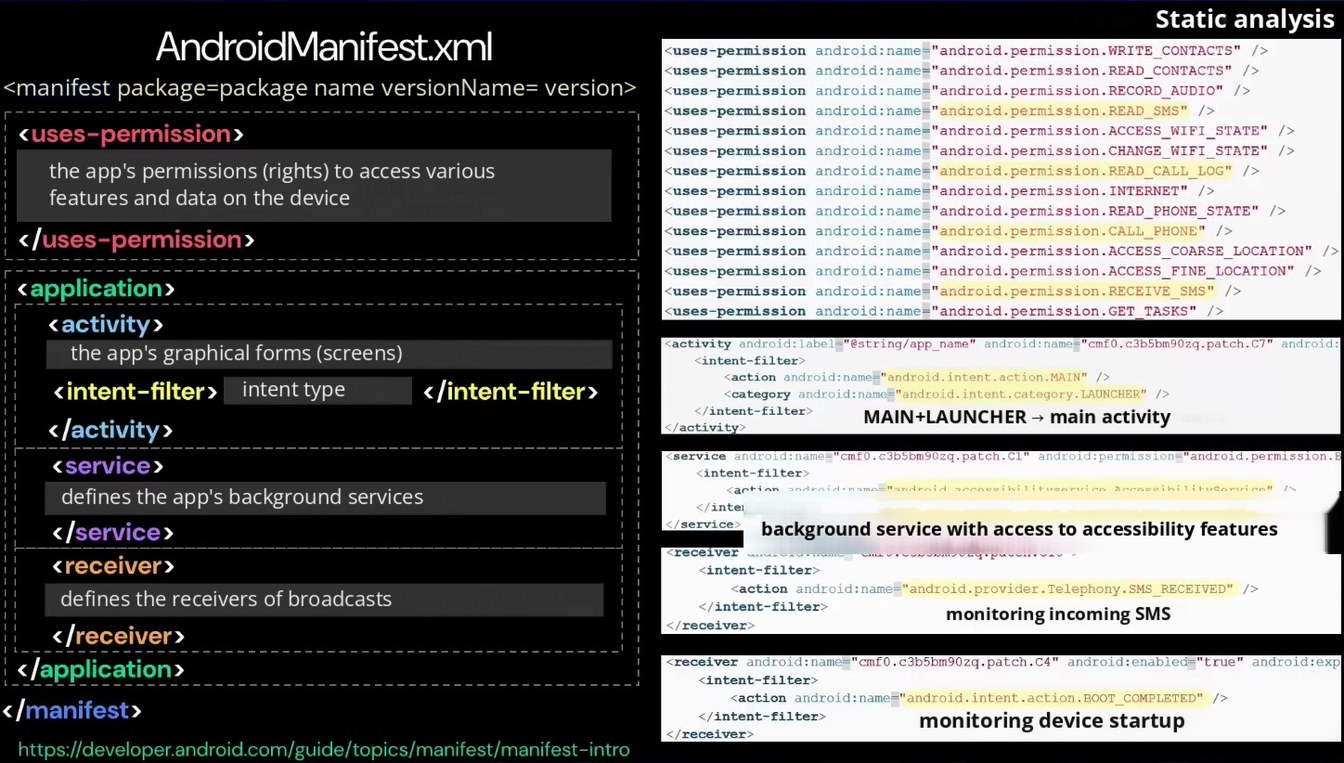
Page 1503:13:52 Slide text
Static analysis
AndroidManifest.xml
<uses-permission android: name-"android.permission. WRITE CONTACTS" <uses-permission android: name="android.permission. READ_CONTACTS" />
<manifest package=package name versionName= version>
‹uses-permission android: name="android.permission. RECORD_AUDIO" /> <uses-permission android: name="android.permission. READ_SMS" />
‹uses-permission›
<uses-permission android: name-"android.permission.ACCESS_WIFI_STATE" ‹uses-permission android: name-"android.permission. CHANGE_WIFI_STATE" />
the app's permissions (rights) to access various features and data on the device
<uses-permission android:name="android.permission. READ CALL LOG" /> <uses-permission android: name="android.permission. INTERNET" />
<uses-permission android: name-"android.permission. READ_PHONE_STATE" <uses-permission android: name="android.permission.CALL PHONE"
‹/uses-permission›
<uses-permission android: name="android.permission. ACCESS_COARSE_LOCATION" <uses-permission android: name="android.permission.ACCESS
_FINE_LOCATION" />
‹application›
<uses-permission android: name="android.permission. RECEIVE SMS" /> <uses-permission android:name="android.permission.GET TASKS" />
‹ activity›
‹activity android:label-"@string/app_name" android:name="cmf0.c3b5bm90zq-patch.C7" android:
the app's graphical forms (screens)
<intent-filter>
<action android:name="android.intent.action.MAIN" />
‹/intent-filter›
‹ intent-filter›
intent type
<category android: name="android. intent.category.LAUNCHER"
</intent-filter>
MAIN+LAUNCHER → main activity
‹/activity›
/activity>
service android:name-"cmf0.c3b5bm90zg.patch.Cl" android:permission="android.permission.E
‹service›
‹intent-filter›
<action android: name="android.accessibilityservice.AccessibilityService"
defines the app's background services
</intent-filter>
background service with access to accessibility features
</ service›
‹/service›
<receiver android: name-"cm10.c3b5bm90zq-patch.c10">
<receiver›
<intent-filter>
<action android:name="android provider. Telephony. SMS RECEIVED" />
defines the receivers of broadcasts
</intent-filter>
monitoring incoming SMS
</receiver>
</receiver›
‹receiver android:name="cmf0.c3b5bm90zq.patch.c4" android: enabled-"true" android:exp
‹/application ›
‹intent-filter›
‹action android: name=" android.intent.action.BOOT COMPLETED" />
‹/manifest›
</intent-filter>
monitoring device startup
</receiver>
https://developer.android.com/guide/topics/manifest/manifest-intro
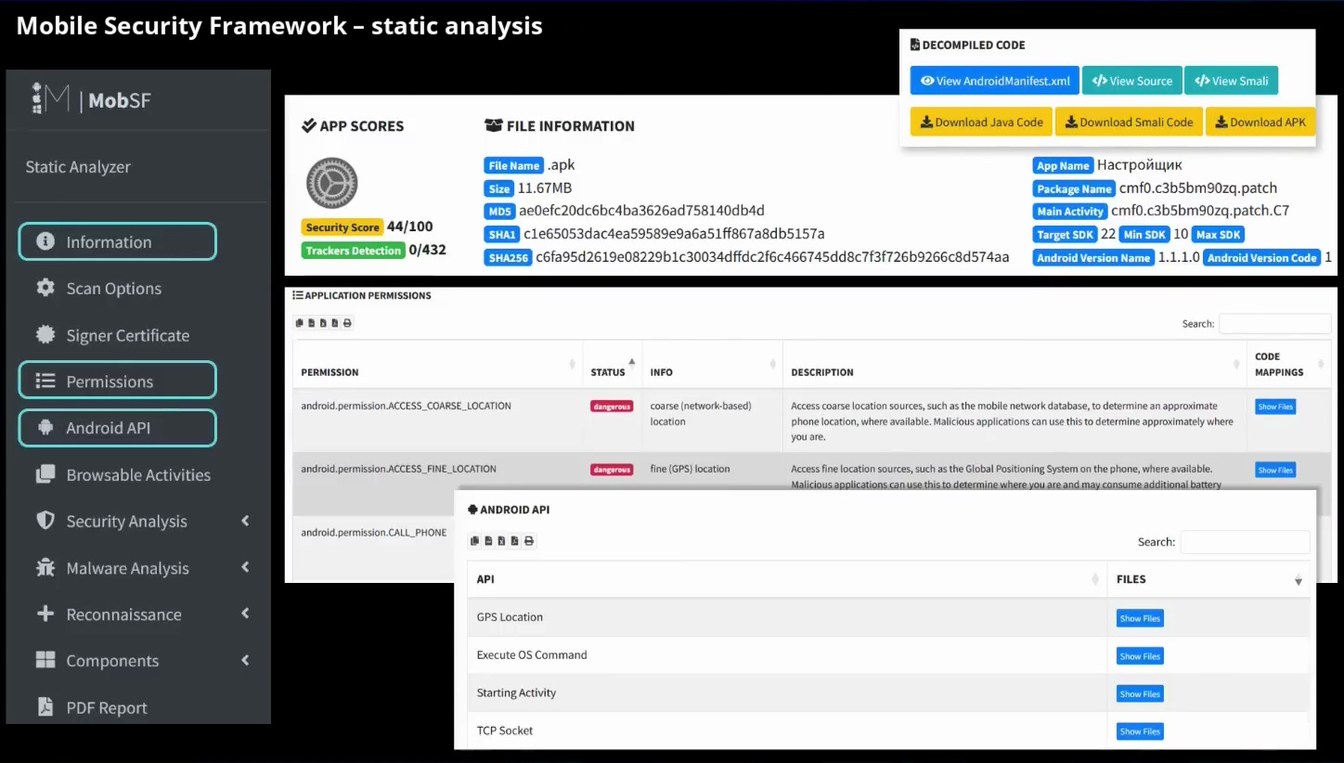
Page 1603:15:40 Slide text
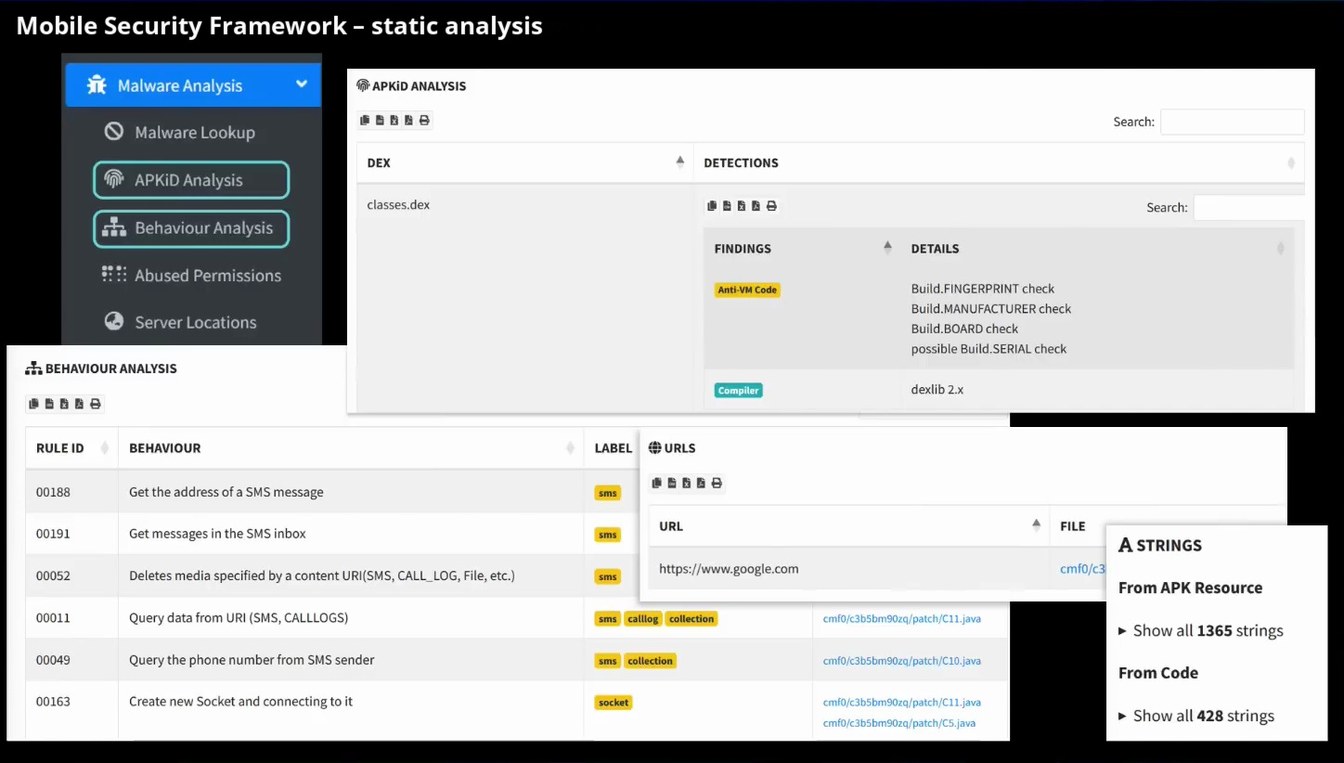
Mobile Security Framework – static analysis
• DECOMPILED CODE
MobSF
/ APP SCORES
→ FILE INFORMATION
c/> View Smali
c/> View Source
© View AndroidManifest.xml
* Download Java Code
* Download Smali Code
* Download APK
Static Analyzer
Information
* Scan Options
App Name Настройщик
•apk
File Name
11.67MB
Package Name cmf0.c3b5bm90zq.patch
Size
aelefc20dc6bc4ba3626ad758140db4d
Main Activity cmf0.c3b5bm90zq.patch.C7
MD5
Security Score 44/100
SHAI cle65053dac4ea59589e9a6a51ff867a8db5157a
Target SDK 22 Min SDK 10 Max SDK
Trackers Detection 0/432
SHA256C6fa95d261908229b1c30034dffdc2f6c466745dd8c7f3f726b9266c8d574aa
Android Version Name 1.1.1.0 Android Version Code 1
:APPLICATION PERMISSIONS
Signer Certificate
Permissions
Android API
PERMISSION
android. permission.ACCESS_COARSE_LOCATION
Search:
STATUS
INFO
DESCRIPTION
CODE
MAPPINGS
coarse (network-based)
Access coarse location sources, such as the mobile network database, to determine an approximate
Show Files
dangerous
location
phone location, where available. Malicious applications can use this to determine approximately where
you are.
Browsable Activities
Security Analysis
Malware Analysis
+ Reconnaissance
android.permission.ACCESS_FINE_LOCATION
fine (GPS) location
dangerous
• ANDROID API
android.permission.CALL_PHONE
API
GPS Location
Access fine location sources, such as the Global Positioning System on the phone, where available.
Show Files
Malicious applications can use this to determine where you are and may consume additional battery
Search:
FILES
Show Files
Components
Execute OS Command
Show Files
PDF Report
Starting Activity
TCP Socket
Show Files
Show Files
Page 1703:17:28 Slide text
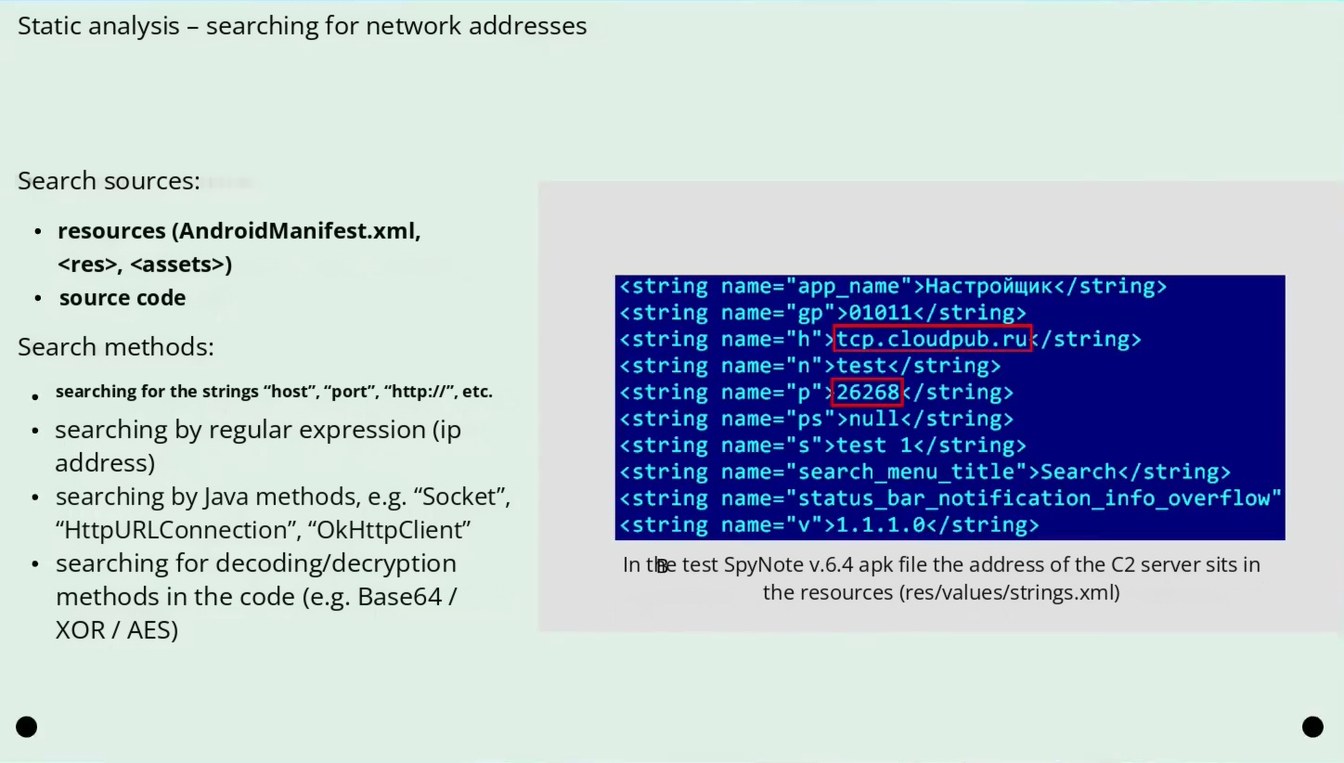
Mobile Security Framework – static analysis
Malware Analysis
nAPKiD ANALYSIS
Malware Lookup
APKiD Analysis
Behaviour Analysis
Abused Permissions
Server Locations
F. BEHAVIOUR ANALYSIS
DEX
classes.dex
DETECTIONS
FINDINGS
Anti-VM Code
Compiler
Search:
Search:
DETAILS
Build.FINGERPRINT check
Build.MANUFACTURER check
Build BOARD check
possible Build.SERIAL check
dexlib 2.x
RULE ID
BEHAVIOUR
* URLS
LABEL
00188
Get the address of a SMS message
00191
00052
00011
00049
00163
Get messages in the SMS inbox
Deletes media specified by a content URI(SMS, CALL_LOG, File, etc.)
Query data from URI (SMS, CALLLOGS)
Query the phone number from SMS sender
Create new Socket and connecting to it
URL
https://www.google.com
calllog
collection
sms
cmf0/c3b5bm90zq/patch/C11.java
sms
collection
cmf0/c3b5bm90zq/patch/C10.java
socket
cmf0/c3b5bm90zq/patch/C11.java
cmf0/c3b5bm90zq/patch/C5.java
FILE
A STRINGS
cmf0/c3
From APK Resource
• Show all 1365 strings
From Code
• Show all 428 strings
Page 1803:19:19 Slide text
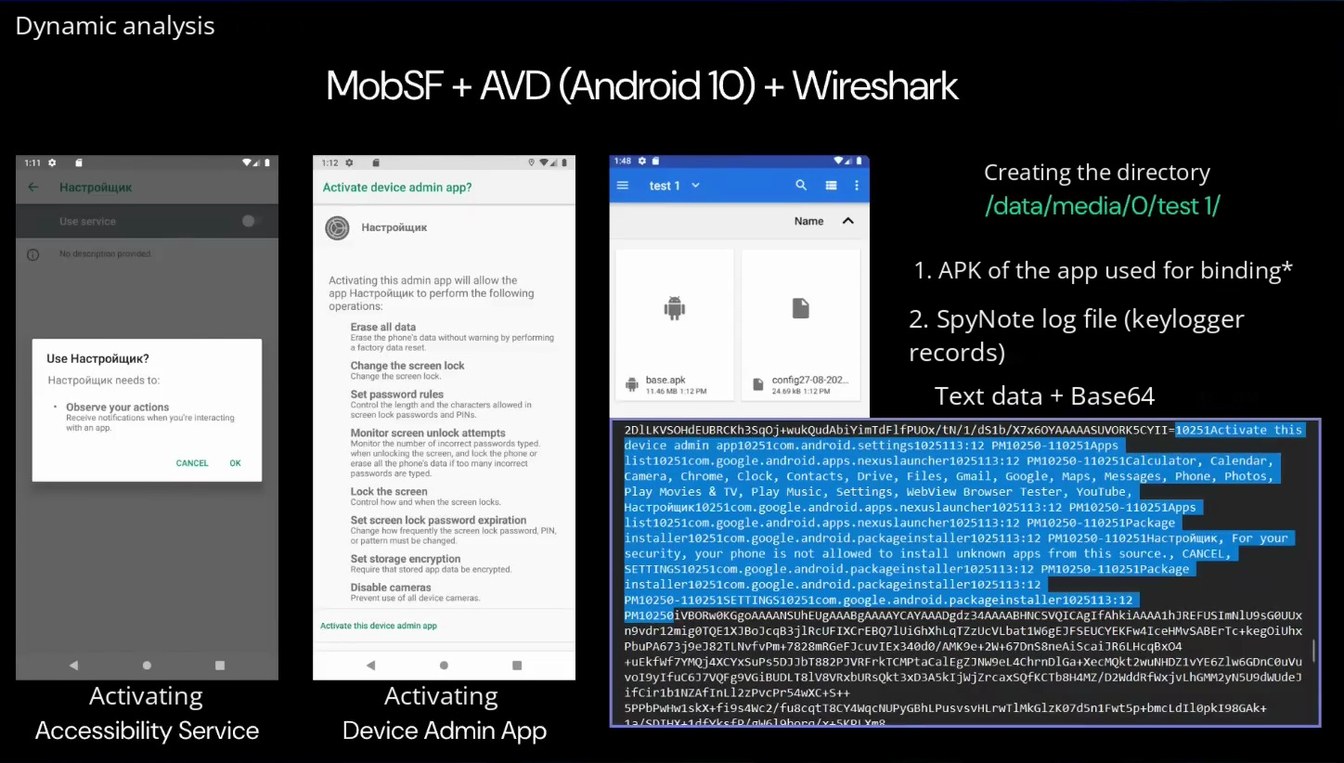
Static analysis – searching for network addresses
Search sources:
resources (AndroidManifest.xml, <res>, <assets>)
source code
Search methods:
searching for the strings “host”, “port”, “http://”, etc.
searching by regular expression (ip address) searching by Java methods, e.g. “Socket”, “HttpURLConnection”, “OkHttpClient”
searching for decoding/decryption methods in the code (e.g. Base64 / XOR / AES)
‹ string name=" app_name"›Настройщик‹/string> ‹string name="gp"> 01011</string> ‹string name="h"› tcp. cloudpub. ruk/string> ‹string name="n"> test</string> ‹string name="p"› 26268</ string> ‹string name="ps">null</string> ‹string name="s"> test 1</string> ‹string name="search_menu_title"› Search‹/string› ‹string name="status_bar_notification_info_overflow" ‹string name="v">1.1.1.0‹/string>
In the test SpyNote v.6.4 apk file the address of the C2 server sits in the resources (res/values/strings.xml)
Page 1903:20:46 Slide text
Dynamic analysis
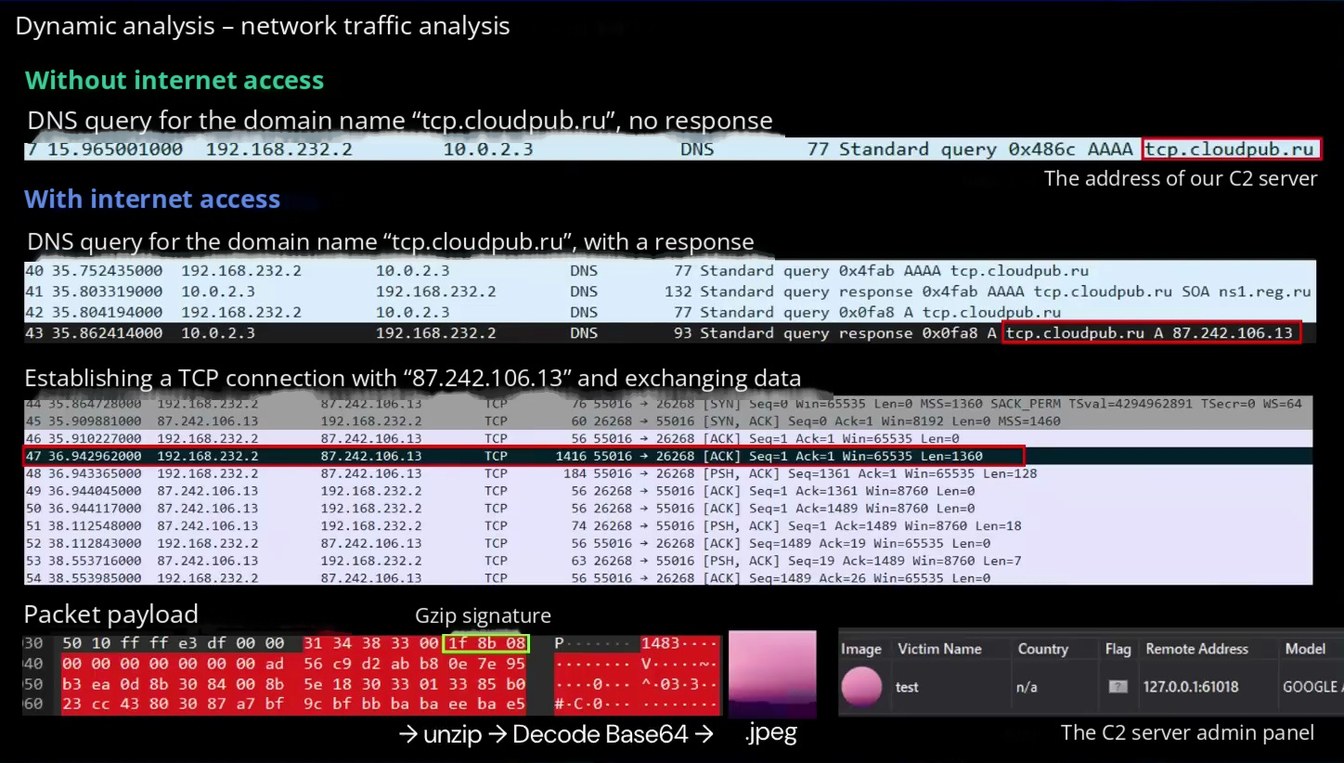
MobSF + AVD (Android 10) + Wireshark
1:11 ฿
Настройщик
Use service
1:12 ฿
Activate device admin app?
Настройщик
1:48 0 g
test 1 v
Name
Creating the directory /data/media/O/test 1/
No description provided.
Use Настройщик?
Настройщик needs to:
• Observe your actions Receive notifications when you're interacting with an app.
CANCEL
OK
Activating
Accessibility Service
Activating this admin app will allow the арр Настройщик to perform the following operations:
Erase all data Erase the phone's data without warning by performing a factory data reset.
Change the screen lock
Set password rules Control the length and the characters allowed in screen lock passwords and PINs.
Monitor screen unlock attempts Monitor the number of incorrect passwords typed, when unlocking the screen, and lock the phone or erase all the phone's data if too many incorrect
passwords are typed
Lock the screen Control how and when the screen locks.
Set screen lock password expiration Change how frequently the screen lock password, PIN. or patter must be changed.
Set storage encryption Require that stored app data be encrypted.
Disable cameras Prevent use of all device cameras.
Activate this device admin app
Activating
Device Admin App
1. APK of the app used for binding*
2. SpyNote log file (keylogger records)
base.apk
config27-08-202...
11.46 MB 1:12 PM
24.69 kB 1:12 PM
Text data + Base64
2DILKVSOHdEUBRCKh3SqOj+wukQudAbiYimTdF1fPU0x/tN/1/dS1b/X7x60YAAAAASUVORK5CYII=10251Activate this device admin app10251com.android.settings1025113:12 PM10250-110251Apps list10251com.google.android.apps.nexuslauncher1025113:12 PM10250-110251Calculator, Calendar,
Camera, Chrome, clock,
Contacts, Drive, Files, Gmail, Google, Maps, Messages, Phone, Photos,
Play Movies & TV, Play Music,
Settings, Webview Browser Tester, Youtube,
Настройи10251.google.android.apps.nexuslauncher1025113:12 PM10250-110251Apps list10251com.google.android.apps.nexuslauncher1025113:12 PM10250-110251Package installer10251com.google.android.packageinstaller1025113:12 PM10250-110251Настройщик, For your security, your phone is not allowed to install
unknown apps from this source., CANCEL,
SETTINGS10251com.google.android.packageinstaller1025113:12 PM10250-110251Package installer10251com.google.android.packageinstaller1025113:12 PM10250-110251SETTINGS10251com.google.android.packageinstaller1025113:12 PM10250iVBORw0KGgoAAAANSUhEUgAAABgAAAAYCAYAAADgdz34AAAABHNCSVQICAgIfAhkiAAAA1hJREFUSImNlU9sG0UUx n9vdr12mig0TQE1XJBoJcqB3j1RcUFIXCrEBQ71UiGhXhLqTZzUcVLbat1W6gEJFSEUCYEKFw4IceHMvSABErTc+keg0iUhx PbuPA673 j9eJ82TLNvfvPm+7828mRGeFcuvIEx340d0/AMK9e+2W+67DnS8neAiScaiJR6LHcqBx04 +uEk fwf7YMQj4XCY×SuPS5DJJbT882PJVRrkTCMPtaCalEgZJNW9L4ChrnDIGa+XecMQkt2wuNHDZ1vYE6Z1w6GDnC@uVu voI9yIfuC617VQFg9VGiBUDLT81V8VRxbURsQkt3xD3A5k1jWjZrcaxSQfKCTb8H4MZ/D2WddRfWxjvLhGMM2yN5U9dWUdeJ ifCir1binZAfInL12zPvcPr54wXC+S++ 5PPbPwHw1skx+fi9s4wc2/fu8cqtT8CY4WqCNUPyGBhLPusvsVHLrwT1MkG1zK07d5n1Fwt5p+bmcLdI10pk198GAk+
Page 2003:22:09 Slide text
Dynamic analysis – network traffic analysis
Without internet access DNS query for the domain name “tcp.cloudpub.ru”, no response
7 15.965001000 192.168.232.2
77 Standard query 0x486c AAAA tcp.cloudpub.ru
10.0.2.3
DNS
The address of our C2 server
With internet access DNS query for the domain name “tcp.cloudpub.ru”, with a response
10.0.2.3
40 35.752435000
192.168.232.2
DNS
77 Standard query 0x4fab AAAA tcp.cloudpub.ru
10.0.2.3
132 Standard query response 0x4fab AAAA tcp.cloudpub.ru SOA ns1. reg.ru
41 35.803319000
192.168.232.2
DNS
192.168.232.2
77 Standard query 0x0fa8
A tcp.cloudpub.ru
10.0.2.3
42 35.804194000
DNS
10.0.2.3
43 35.862414000
93 Standard query response 0x0fa8 A tcp.cloudpub.ru A 87.242.106.13
192.168.232.2
DNS
Establishing a TCP connection with “87.242.106.13” and exchanging data
44 35. 864728000
76 55016 → 26268 [SYN] Seq=0 Win=65535 Len=0 MSS=1360 SACK_PERM TSval=4294962891 TSecr=@ WS=64
192.168.232.2
87.242.106.13
TCP
87.242.106.13
192.168.232.2
60 26268 → 55016 [SYN, ACK] Seq=0 Ack=1 Win=8192 Len=0 MSS=1460
45 35.909881000
TCP
46 35.910227000
192.168.232.2
87.242.106.13
TCP
56 55016 → 26268
[ACK] Seq=1 Ack=1 Win=65535 Len=0
1416 55016 → 26268
[ACK] Seq=1 Ack=1 Win=65535 Len=1360
47 36.942962000
192.168.232.2
87.242.106.13
TCP
184 55016 → 26268
ACK] Seq=1361 Ack=1 Win=65535 Len=128
TCP
[PSH,
48 36.943365000
192.168.232.2
87.242.106.13
26268 → 55016
Seq=1 Ack=1361 Win=8760 Len=0
[ACK]
36.944045000
87.242.106.13
192.168.232.2
TCP
56
49
56 26268 → 55016 [ACK] Seq=1 Ack=1489 Win=8760 Len=0
50
36.944117000
87.242.106.13
192.168.232.2
TCP
74 26268 → 55016 [PSH, ACK] Seq=1 Ack=1489 Win=8760 Len=18
51
38.112548000
87.242.106.13
192.168.232.2
TCP
55016 → 26268 [ACK] Seq=1489 Ack=19 Win=65535 Len=0
52
38.112843000
192.168.232.2
87.242.106.13
TCP
56
63 26268 → 55016 [PSH, ACK] Seq=19 Ack=1489 Win=8760 Len=7
53 38.553716000
87.242.106.13
192.168.232.2
TCP
54 38.553985000
192.168.232.2
87.242.106.13
TCP
56 55016 → 26268 [ACK] Seq=1489 Ack=26 Win=65535 Len=0
Packet payload
Gzip signature
1f 8b 08
ff
ff
1483 • ..
130
50
10
e3
00
00
31
34
38
33
00
00
00
00
00
00
00
ad
56
d2
ab
7e
95
140
00
0e
л. 03-3. .
5e
be
150
0d
8b
30
84
00
8b
18
30
33
01
33
85
ea
bf
bf
bb
ba ee
60
23
43
80
30
87
a7
9c
ba
ba
e5
CC
jpeg
→ unzip → Decode Base64 →
Model
Image
Victim Name
Country
Flag
Remote Address
test
127.0.0.1:61018
GOOGLE.
The C2 server admin panel
Page 2103:23:15 Slide text
Forensics
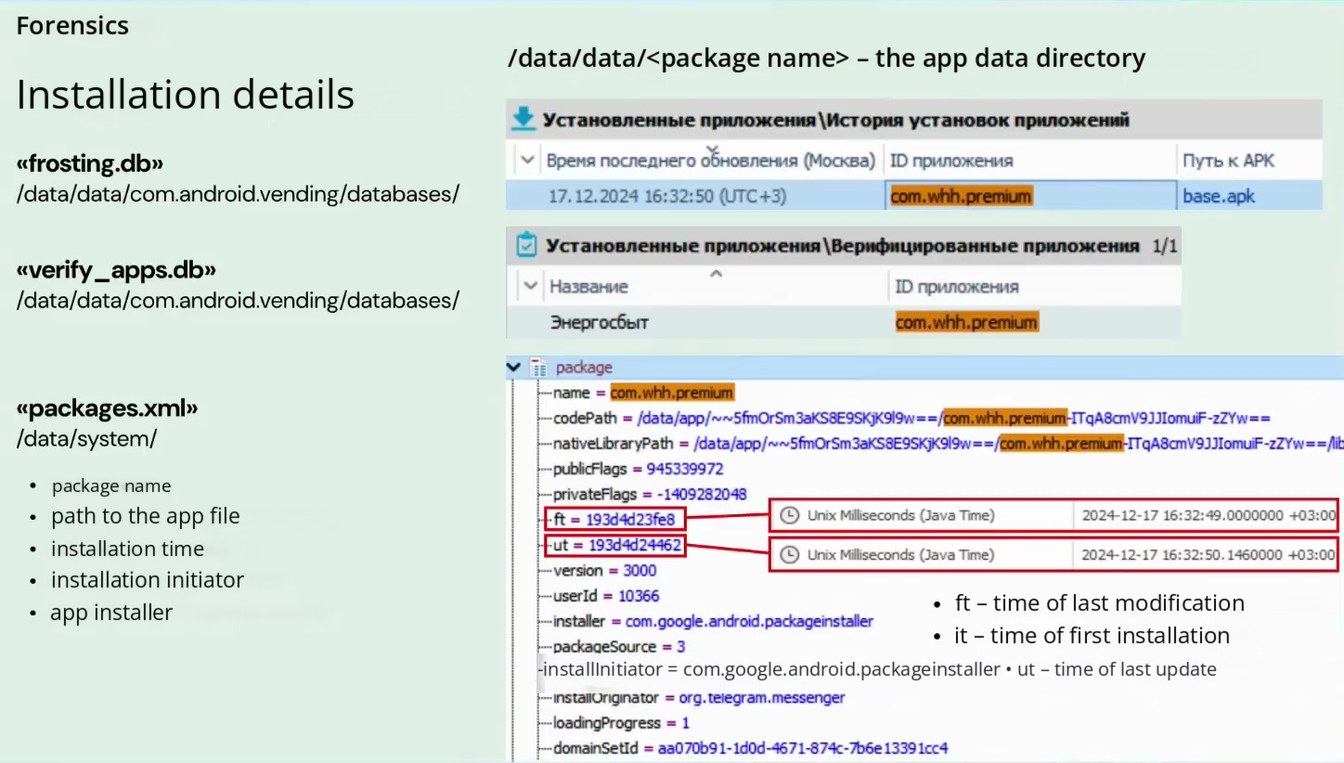
/data/data/<package name> – the app data directory
Installation details
• Установленные приложения \История установок приложений v Время последнего обновления (Москва) ID приложения
Путь к АРК
«frosting.db» /data/data/com.android.vending/databases/
com.whh.premium
17.12.2024 16:32:50 (UTC+3)
base.apk
«verify _apps.db» /data/data/com.android.vending/databases/
• Установленные приложения \Верифицированные приложения 1/1
v Название
Энергосбыт
ID приложения
com.whh.premium
«packages.xml» /data/system/
package name
path to the app file
installation time
installation initiator
app installer
v it package
-name = com.whh.premium
--codePath = /data/app/~~5fmOrSm3aKS8E9SKjK9|9w==/com.whh.premium-ITqA8cmV9JJlomuiF-zZYw== -nativeLibraryPath = /data/app/~vw5fmOrSm3aKS8E9SKjK9l9w==/com.whh.premium-ITqA8cmV9JJIomuiF-zZYw==/lit -publicFlags = 945339972 -privateFlags = -1409282048
Unix Milliseconds (Java Time)
2024-12-17 16:32:49.0000000 +03:00
-- ft = 193d4d23fe8
-ut = 193d4d24462
Unix Milliseconds (Java Time)
2024-12-17 16:32:50.1460000 +03:00
-version = 3000
-userId = 10366
ft – time of last modification
-installer = com.google.android.packageinstaller
it – time of first installation
-packageSource = 3
-installInitiator = com.google.android.packageinstaller • ut – time of last update
-installOriginator = org.telegram.messenger
.. loadingProgress = 1
.- domainSetid = aa070b91-1d0d-4671-874c-7b6e 13391cc4
Page 2203:24:12 Slide text
Forensics
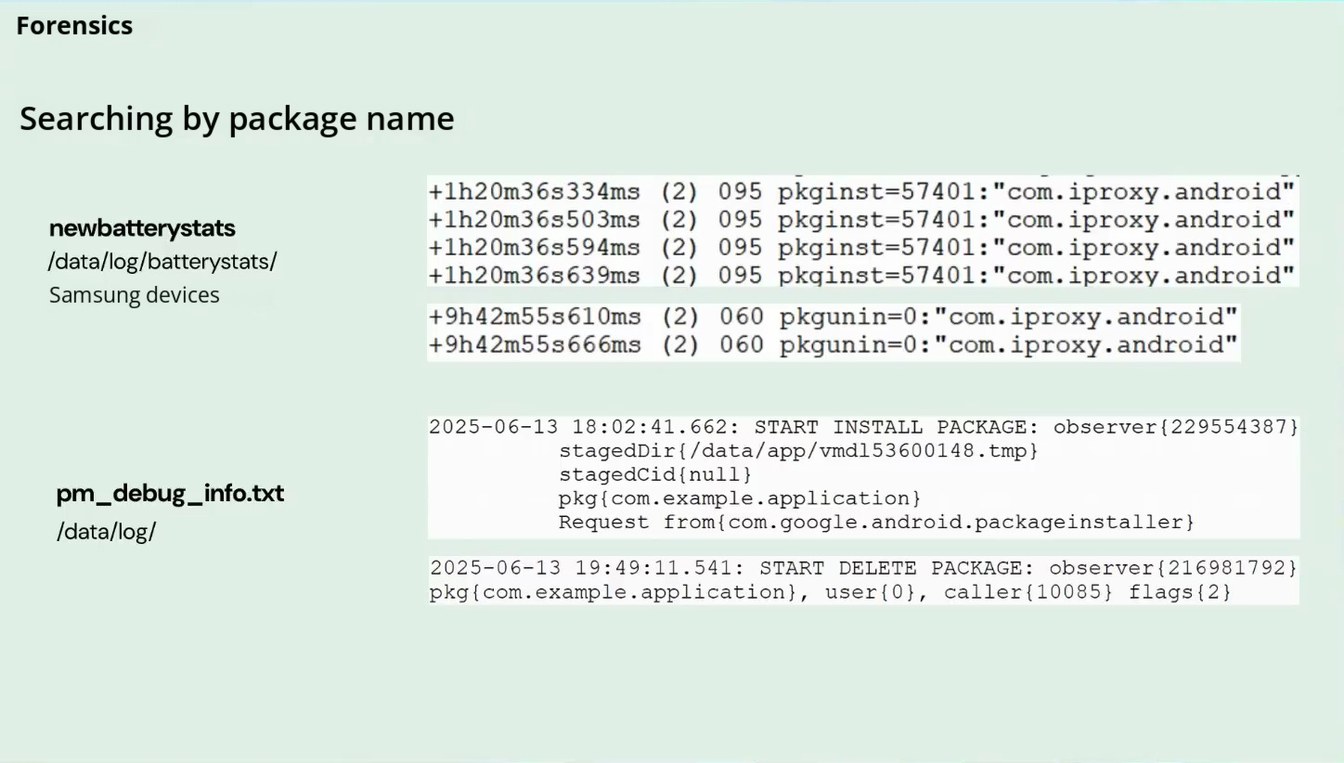
Searching by package name
newbatterystats /data/log/batterystats/ Samsung devices
+1h20m36s334ms (2) 095 pkginst=57401: "com. iproxy.android" +1h20m36s503ms (2) 095 pkginst=57401: "com.iproxy.android" +1h20m36s594ms (2) 095 pkginst=57401: "com.iproxy.android" +1h20m36s639ms (2) 095 pkqinst=57401: "com.iproxy. android"
+9h42m55s610ms (2) 060 pkgunin=0: "com.iproxy.android" +9h42m55s666ms (2) 060 pkgunin=0: "com.iproxy.android"
pm_debug_info.txt /data/log/
2025-06-13 18:02:41.662: START INSTALL PACKAGE: observer (229554387)
stagedDir(/data/app/vmdl53600148.tmp} stagedCid(null) pkg(com. example.application) Request from{com.google.android.packageinstaller}
2025-06-13 19:49:11.541: START DELETE PACKAGE: observer (216981792} pkg(com.example.application), user(0}, caller(10085) flags(2)
Page 2303:25:05 Slide text
Forensics
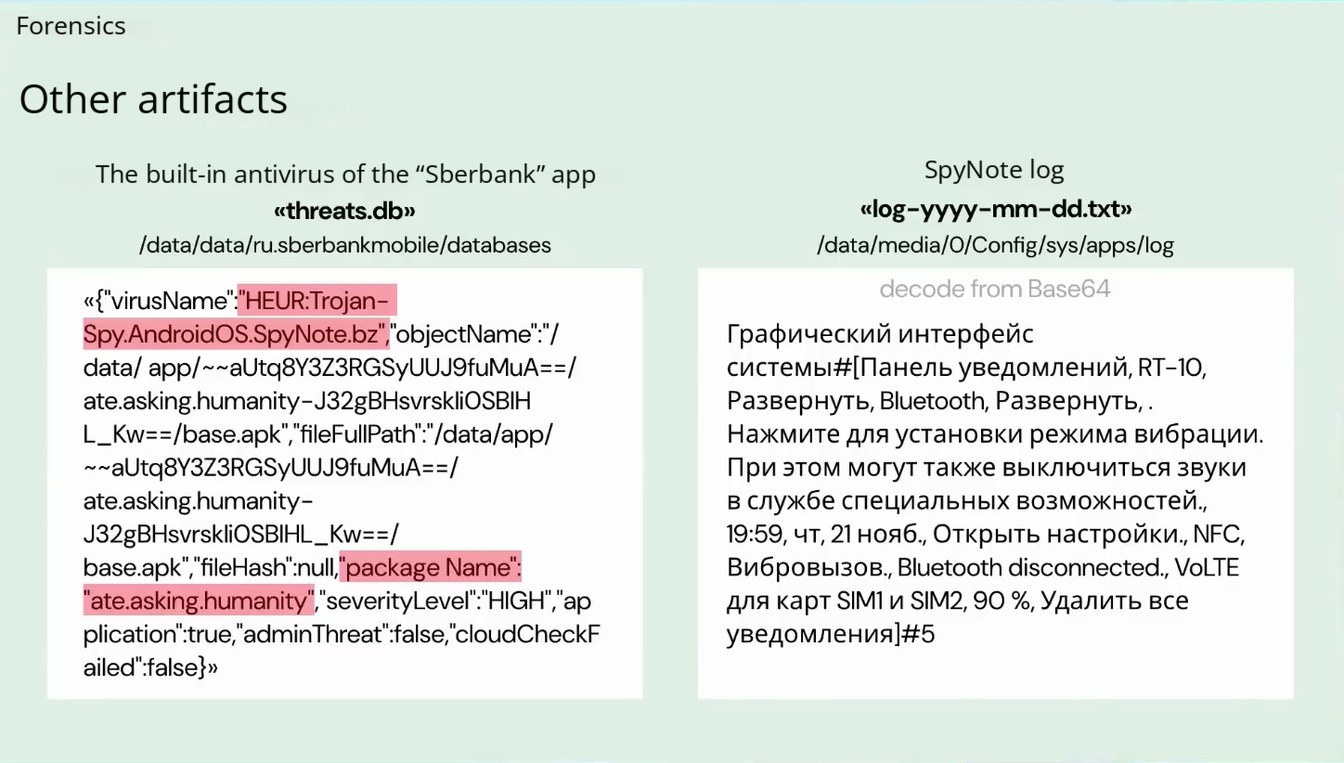
Other artifacts
The built-in antivirus of the “Sberbank” app
«threats.ab»
/data/data/ru.sberbankmobile/databases
SpyNote log
«log-yyyy-mm-dd.txt»
/data/media/O/Config/sys/apps/log
«{"virusName":"HEUR:Trojan- Spy. AndroidOS.SpyNote.bz", objectName""/ data/ app/~~aUtq8Y3Z3RGSyUUJ9fuMuA==/ ate.asking.humanity-J32gBHsvrskliOSBIH
L_Kw==/base.apk", "fileFul|Path":"/data/app/
~~aUtq8Y3Z3RGSyUUJ9fuMuA==/ ate.asking.humanity- J32gBHsvrskliOSBIHL_Kw==/ base.apk", fileHash" null"package Name": "ate.asking.humanity", severityLevel" HIGH", ap plication" true,"adminThreat" false,"cloudCheckF ailed":false}»
decode from Base64
Графический интерфейс системы#[Панель уведомлений, RT-10, Развернуть, Bluetooth, Развернуть,. Нажмите для установки режима вибрации. При этом могут также выключиться звуки в службе специальных возможностей., 19:59, чт, 21 нояб., Открыть настройки., NFC, Вибровызов., Bluetooth disconnected., VoLTE для карт SIM1 и SIM2, 90 %, Удалить все уведомления|#5